I’m seeing the real world results of this. We’re getting a little bit more out of the gigabytes of RAM that is in each of our hosts with Windows Server 2008 R2 Hyper-V instead of its predecessor, even with our hardware which does not have the very latest processor.
One of the main players in saving RAM on Hyper-V hosts with newer hardware will be SLAT or Second Level Address Translation.
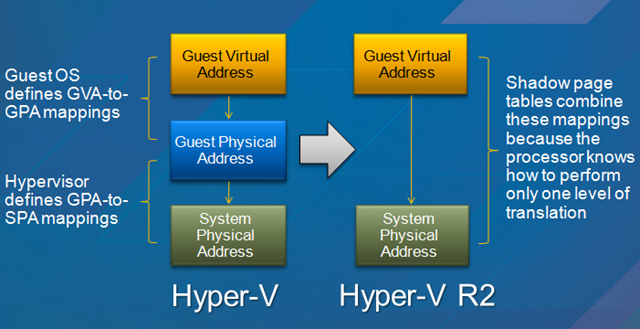 In Windows Server 2008 Hyper-V the parent partition (host operating system) is responsible for mapping the physical memory in the host with the memory that is running in the virtual machine. Windows Server 2008 R2 Hyper-V removes that middle layer of management by offloading the responsibility to dedicated functions in the CPU.
CPU’s that have Intel’s Extended Page Tables (EPT) or AMD’s Nested Page Tables (NPT) or (Rapid Virtualization Indexing (RVI) have the ability to by delegated this responsibility. This gets rid of the “shadow table” that the parent partition otherwise had to use … which was also consuming RAM.
It’s estimated that you will save 1MB of RAM per VM (there is an overhead of RAM for every VM and GB RAM in that VM) and there is also a small saving in CPU time required.
Also, for using Hyper-V as a desktop virtualisation client, it will rectify the Hyper-V graphics performance problems.