Windows Server Technical Preview – Cluster Compute Resiliency

Imagine a scenario:

  1. You have a cluster of Hyper-V hosts
  2. Some operator pulls the wrong network cables
  3. A host becomes network-isolated and the cluster heartbeat times out before the mistake is noticed
  4. Virtual machines fail over

Great, right? HA kicked in? That’s good … right!?!?!

Ummm maybe not. Let me ask you a question. Which is worse:

  • A virtual machine being offline for a minute or so because the host is network-isolated? OR …
  • Every virtual machine on that host stops executing, fails over to other hosts in the cluster, and takes several minutes to boot and get services responsive on the network.

For most people, option A is more favourable and this is why Microsoft is giving us Cluster Compute Resiliency.

With this new feature, a cluster will become more tolerant (and this is configurable) to transient network errors. In the event of a heartbeat timeout, the host will go into isolation. This will allow VMs on that host to continue executing and prevent additional VMs being placed onto that host. If the host becomes responsive within a certain time frame then it comes out of isolation. If the host does not become responsive then VMs are failed over to other hosts.

Note that if a host is determined to be “flapping” then it will be put into Cluster Quarantine.

My Top Articles in 2014

2014 was a fun year to be a blogger in the Microsoft world. Traffic to my site continued to grow, and eventually I was forced by my web hoster to move to a dedicated virtual machine. I stayed with them for a while before moving to Azure … and that’s when my traffic more than doubled! I don’t know if was the fact that I am now hosted on Azure or if it’s because I revisited all my WordPress plugins, including SEO.

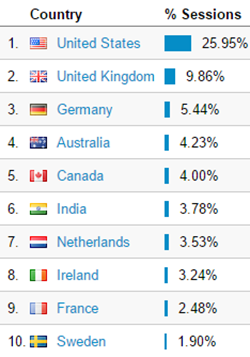
Where are these people coming from?

image

The USA dominates. And Ireland punches above it’s weight, probably because I’m Irish, of course. In the USA, California and Texas must be the hotbeds for Hyper-V:

image

Washington State isn’t far behind, and I always chuckle to see how much traffic comes out of Redmond 🙂

What OS are all these people using?

image

Obviously Windows desktop OS is the clear winner. I surprised that iOS beats Android. And considering the skewed percentage of Windows Phones used by people in our industry, I am very surprised that Windows Phone is less than 1% of the client OSs hitting my site.

OK, now on to what people are reading. Interestingly, it’s lots of old stuff!

If we look at how active people were on the pages, most have a minute or more of reading. But some folks were more active on some pages causing “events” as they are called in Google Analytics. The .Net page wins there. But after that it’s a different profile of page, with the content being much newer.

My “Microsoft News” pages aren’t huge aggregators of hits like the older “how to” articles, but they still create lots of interest every day. And to be honest, I use them as my own personal notebook to keep up with what’s going on 🙂

So how do I summarize all this? Interest in Hyper-V, etc continues to rise, based on my small sample. People are looking for information on the 2012/2012 R2 generation of products (that’s good!). But people are struggling with licensing and some techie things that are unwanted distractions.

Mark Twain’s Advice on Microsoft Azure

I’ve been doing Azure events since August and I’ve come to the conclusion that there are 3 types of people in the audience:

  • Want to learn now – a small percentage of the audience
  • Have a small measure of interest but never try anything out – maybe over half of the room
  • Are only attending to learn how to compete with Azure or their boss forced them – everyone else in the room

I’m guessing the breakdown is similar at most cloud IaaS events. And I’ve not forgotten the those who are hoping that the US government kills off the cloud and wouldn’t attend a cloud event if it was the only place to be inoculated against the zombie apocalypse. And let’s not forget those clock punchers who make up the sad majority of IT pros and haven’t tried to learn anything since 2004.

O365 gives us a great track record that we can use to predict the future of Azure. We are in early days of Azure and uptake looks slow. But it was like this with BPOS/Office 365 before O365 became the norm for email here in Ireland. A few disruptors decided to skill up on Office 365 and those Microsoft partners shook up the market. They became the industry experts and they took business from their competitors:

  • By being the only resellers around that implemented a solution that customers wanted
  • By having developed skills over time that allowed them to take customers away from competitors that were doing a bad job

The time to learn Azure is now. Don’t procrastinate. Don’t be the moron that thinks “the cloud will never work for my customers” or “my customers are too small for Azure”. Take some advice from Mark Twain:

The secret of getting ahead is getting started.

So you’re serious about Azure but the scale of it scares you? That’s fair. That’s why Microsoft has taken a very targeted approach with Azure-based solutions via Open Licensing. And it’s why I’ve been delivering Azure technical training on a monthly chunk-by-chunk basis. The Mark Twain quote actually covers this too:

The secret of getting started is breaking your complex overwhelming tasks into small manageable tasks, and starting on the first one.

If you’re starting with Azure, find an on-ramp solution like online backup or DR, and use this to supplement your existing skills. Learn the basics of storage and virtual networking.

Windows Server Technical Preview – Differential Export

A differential export is an export of the differences of a virtual machine from between two points in time. It is used to enable an incremental backup of a virtual machine that is backed up using the new file-based backup system with Resilient Change Tracking. The below image shows the state of a VM and its backup after a full backup. Note that this file-based backup has used Resilient Change Tracking to identify what changes are being made to the VM’s storage since the backup.

image

An incremental backup starts, using the differential export process. A backup checkpoint, including VM configuration and VHD fork (via AVHD) is created. The existing Resilient Change Tracking ID T1 is used to determine what has changed in the parent VHD to create a differential export of the VM in the backup target media (exported VM configuration T2 and the differential VHD).

image

The backup checkpoint is removed and a new RCT ID (T2) is created so we can now do Resilient Change Tracking of the VHD for the time after the backup.

image

Old reference points (RCT IDs) can be disposed of as required.

A “synthetic full backup” process is also support for third-party backup solutions.

image

Hyper-V PM Taylor Brown talks about Change Tracking in his session at TechEd Europe 2014.

Wrapping Up 2014

It’s dark outside, it’s raining, there’s Christmas songs on the radio, and there wasn’t much traffic this morning. It’s beginning to sound a lot like Christmas, and we’re coming to the end of another year.

Work at MicroWarehouse Ltd. (not the UK company of the same name) has been interesting. I’ve made a career for myself by being able & willing to take on new things. I started off as a C programmer and fell into Windows desktop/Server. I then discovered System Center before it was called that. And I jumped from VMware to Hyper-V in the early days and that worked out too. I started working with Azure back in January when it became obvious that Microsoft would have to bring it to our customer base via Open licensing. That investment worked out, and I’ve spent most of my time since August either preparing or delivering Azure-related training to sales or technical staff of Irish and Northern Irish resellers. I don’t see Azure as a Hyper-V replacement – far from it – but it is a great supplemental technology, and my experience with Hyper-V has been a great help. We’re starting to hear of fun-sounding Azure opportunities for our customers so the ball might be starting to pick up some momentum.

I brought a few products to the attention of my boss over the past 18 months. The DataOn business has exploded, and we’re selling loads of cluster-in-abox units and JBODs throughout Europe. We’ve just taken on 5nine Software, and conversations with some others have begun to heat up.

WP_20141219_17_36_41_Pro 9 DataOn JBODs going out to a customer that is deploying Scale-Out File Servers instead of HP 3Par SANs

Life as an MVP continued. There were fun online & in-person events and podcasts where I got to talk about Hyper-V, and Windows Server storage and networking. While the amount of material I could blog about on this site dried up a little, I was continuing to add content on Petri.com. And of course, we had the announcements on Windows 10 and Windows Server vNext, so there’s a whole new pool of content to write about, so my activity here has been renewed. I’ve also been buoyed by the fact that the traffic to this site has more than doubled over the past year. Thank you!

We MVPs get a great opportunity to interact with the product groups from Microsoft – that’s the biggest benefit as an MVP. Those who capitalize on this get a huge career boost. And this year has been especially rewarding. We MVPs give a lot of feedback to Microsoft. Some of us Euro-cloud MVPs have been especially impressed to see how this has impacted product over the past 12 months. I can’t talk specifics, but there are things that we have brought up that have turned into headline features.

One of the best bits of being an MVP is making lots of new friends. I get to meet up with lots of people who I’ve only gotten to know through this community, some are MVPs and some are not. We MVPs bump into each other a lot and it’s always great to hang. And there are others, be they co-writers, regular attendees, sponsors, Microsoft staff, or whatever, that I enjoy meeting up with too.

Career-wise there were two huge highlights for me. I was going to TechEd North America 2014 in Houston, but I wasn’t planning on competing in Speaker Idol (a multi-round speaking competition, like X Factor or American/Pop Idol, with 1st place overall winning a slot in the following year’s conference). The organiser, Richard Campbell, had invited me onto a podcast to talk and afterwards asked me to compete. I changed my mind right there – part of it was I knew who one of the judges was and I had the perfect idea to have a little fun. And then I qualified for the final. I wasn’t nervous, but now I was serious. But when I saw how many turned out to support me, I became nervous. In the end, I was honoured to win. That was frikin’ amazing. I was on cloud 9 until the exhaustion of preparing into the week hours the previous night on top of 5 days of jetlag kicked in.

Me warming up the crowd at the start of my final session at Speaker Idol

Another career highlight was also at TechEd, this time in Barcelona for the Europe 2014 event. For the first time ever, I was selected to be a speaker, talking about my favourite topic: Hyper-V. I love finding the nitty gritty bits, and I love explaining them to people. I was chuffed to see so many familiar faces from around Europe (and further afield) and to see how many people came to see me talk. Damn, I was nervous. The first slides (NUMA)  were tricky to explain to an audience where English is mostly the second language. I rehearsed those slides over and over and over. Once I was over the start, I was able to enjoy myself. And then it was cool that so many came up to ask questions when I was finished.

Speaking at TechEd (Europe) for the first time

For me, 2014 will be most remembered for what happened outside of “work”. It’s been a special year personally. Life is pretty damned great.

I hope 2014 was as kind to you as it was for me. If it wasn’t then I know from experience that a horrid year can turn into something special. Hold on, work hard, and give life a chance. Have a 2015!
Microsoft News – 19 December 2014

We’re getting close to Christmas and Microsoft is starting to wind down for the year. Here’s a mostly-Azure report for the last few days.

Hyper-V

Azure

Miscellaneous

Hyper-V Does Support Nested Virtualization

Actually, no, Hyper-V does not support nested virtualization but there’s nothing like a little bit of link bait to celebrate the holidays 🙂

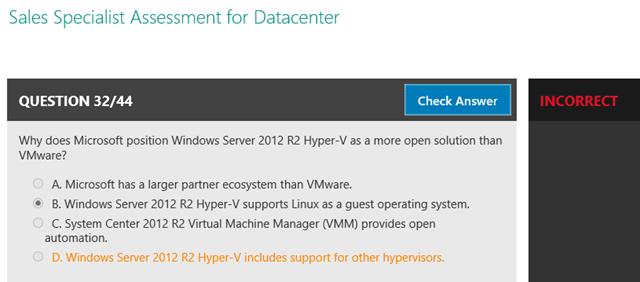
We were topping up our Microsoft partner competencies in the office this morning. A part of that shenanigans is to site “online sales assessments”. For the Datacenter competency (including Azure, Hyper-V and System Center) the exam asks 44 questions in a sales scenario. Some of them are legit questions about product, solutions, and licensing. But most of them are either:

  • Complete bolloxology
  • Random collections of words that were copy/pasted from the Microsoft Partner Network by a loudmouth

Let me give you one example. Why does Microsoft position Windows Server 2012 R2 Hyper-V as a more open solution than VMware? As you might have read on my site, the correct answer is that Microsoft has contributed quite a bit of code to the Linux kernel to make it natively functional on Hyper-V. This includes hot-VHDX resizing, live backup of running Linux VMs, and support for Dynamic Memory for Linux guests, all making Hyper-V the best hypervisor to run Linux on.

But no, that’s not the correct answer in the eyes of the Microsoft partner network. No; they believe that Hyper-V supports other hypervisors. Remember that Azure is based on Hyper-V so that is actually the SAME hypervisor. This incorrect correct answer implies either that Hyper-V can live migrate VMs to/from other hypervisors such as vSphere, or that Hyper-V supports nested virtualization. Of course, neither of these is true.

image

And there is yet another example of why Microsoft’s entire examination process (including the MCP certification process) is not taken seriously by anyone outside of the staff of the Microsoft Partner Network, HR departments, and head hunters.

Windows Server Technical Preview – File-Based Backup

In Microsoft endeavors to finally close the book on backup issues, the Hyper-V team is switching to file-based backup, and moving from the non-scalable VSS backup. Let’s face it – most hardware VSS Providers have been like a curse.

When you backup a VM in vNext, a “backup checkpoint” is created. This forks the VM’s configuration is forked and the virtual hard disk(s) is forked too using an AVHD. This is done for a short period of time. This allows changes to continue while the backup is being done. The virtual machine can be live exported as a backup.

image

After this operation a dateless Reference Point is created. The AHVD(s) is merged back into the parent VHD(s). This reference point notes the Resilient Change Tracking ID (per VHD), so we know what changes are made after the AVHD was created, and now we know what blocks must be backed up in a following incremental backup.

image

Some notes:

  • Incremental and “synthetic full” backups can now follow the full backup and this is done using a Differential Export.
  • A restore is basically a process of copying the VM files from backup media and importing the VM.

SAN-based backup is different. A LUN snapshot will retain the parent VHD and AVHD, and only the VM configuration is exported by Hyper-V. CDS, SMI-S or network providers be used to create the LUN backup. The LUN snapshot is removed and job done.

Hyper-V PM Taylor Brown talks about file-based backup in his session at TechEd Europe 2014.

image

Windows Server Technical Preview – Resilient Change Tracking

Windows Server Hyper-V has had an … interesting … history when it comes to backup. It has been a take-it-personally mission of the Hyper-V team to stop backup being an issue for Hyper-V customers. Backup of CSV in Windows Server 2008 R2 was not fun. Things got better in WS2012, and again in Windows Server 2012 R2. And we might finally be getting there with the next release of Windows Server.

An important change to Hyper-V backup is to enable partners to keep up with the pace of change of Windows Server – we’ve seen some backup vendors take years to catch up with a new version, and this prevents mutual customers from keeping their hosts in step with Microsoft.

In order for a backup product to do incremental backups, it needs to do block based change tracking. Each vendor has to create one of these filter drivers that sits in the storage stack. This stuff is hard to do right, and it can cause stability and performance issues if not done correctly. And it also slows down the development/re-test/re-certify of BackupProduct2016 to keep up with the release of Windows Server 2016.

Some bad change tracking implementations, that you may know of, lived in memory as bitmaps. If the host had an un-planned outage then the next backup had to be a full backup. Or maybe if the VM live migrated to another host, that VM would have to do a full backup because the change tracking was no longer in the memory of the host.

Resilient Change Tracking is built-in backup change tracking of changed blocks within virtual hard disks. It is used for incremental backup, and it is the underlying engine for differential export. The change tracking bitmap lives in memory and on-disk. The on-disk bitmap is not as granular because it is the fallback from the much more detailed in-memory bitmap.

The goal now is that backup vendors should stop writing their own filter driver to implement change tracking. If they use the built-in resilient change tracking then they can focus more time on feature development testing/certification, and keep up with Microsoft’s frequent releases of Windows Server. And hopefully, Microsoft’s change tracking will undergo suitable levels of testing that will give all customers a universally stable and well-performing subsystem.

Hyper-V PM Taylor Brown talks about Change Tracking in his session at TechEd Europe 2014.