TEE14–Designing Scale Out File Servers, Including vNext

I am live blogging this session. Refresh to see more.

Speaker: Claus Joergensen

I arrived in 15 minutes late so the start of this is missing. Claus was finishing off a refresh on Storage Spaces.

The session so far seems to be aimed at beginners to SOFS – of which there are plenty. I will not take detailed notes on this piece unless I hear something I haven’t heard before.

FAQ

  • Can I use SOFS for IQ workloads. Not recommended. Design for the files of Hyper-V, SQL.
  • CSV Cache Size? As big as you can. e.g. 64 GB
  • Uses SOFS as file share witness for Hyper-V clusters? yes, but specific instructions
  • How many nodes? 2-4 nodes in a SOFS
  • Evaluate performance? Not file copy. Use DiskSpd
  • Disable NetBIOS? Yes. It can reduce failover times.

CPS

TEE14–Lessons From Scale

I am live blogging this so hit refresh to see more

Speaker: Mark Russinovich, CTO of Azure

Stuff Everyone Knows About Cloud Deployment

  • Automate: necessary to work at scale
  • Scout out instead of scale up. Leverage cheap compute to get capacity and fault tolerance
  • Test in production – devops
  • Deploy early, deploy often

But there are many more rules and that’s what this session is about. Case studies from “real big” customers on-boarding to Azure. He omits the names of these companies, but most are recognisable.

Customer Lessons

30-40% have tried Azure already. A few are considering Azure. The rest are here just to see Russinovich!

Election Tracking – Vote Early, Vote Often

Customer (a US state) create an election tracking system for live tally of US, state and local elections. Voters can see a live tally online. A regional election worked out well. Concerned because it was a little shaky with this light-load election. Called in MSFT to analyze the architecture/scalability. The system was PaaS based.

Each TM load balanced (A/P) view resulted in 10 SQL transactions. Expected 6,000,000 views in the peak hour or nearly 17,000 queries per sec. Azure DB scales to 5000 connects, 180 concurrent requests and 1000 requests per sec.

image

MSFT CAT put a caches between the front-end and DB with 40,000 requests per instance capability. Now the web roles hit the cache (now called Redis) and the cache hit the Results Azure DB.

At peak load, the site hit 45,000 hits/sec, well over the planned 17,000. They did a post-mortem. The original architecture would have failed BADLY. With the cache, they barely made it through the peak demand. Buffering the databases saved their bacon.

To The Cloud

A customer that does CAD for bildings, plants, cicil and geospatial engineering.

Went with PaaS: web roles on the front, app worker roles in the middles, and IaaS SQL (mirrored DB) on the backed. When they tested the Azure system had 1/3 of the work capacity of the on-premises system.

The web/app tier were on the same server on-premises. Adding a network hop and serialization of data transfer in the Azure implementation reduced performance. They merged them in Azure … web role and worker roles. They decided colocation in the same VMs was fine: they didn’t need independent scalability.

Then they found IOPS of a VHD in Azure was too slow. They used multiple VHDs to create two storage spaces pools/vdisks for logs and databases. They then created a 16 VHD pool with 1 LUN for DBs and logs. And they got 4 times the IOPS.

What Does The Data Say?

A company that does targeted advertising, and digests a huge amount of date to report to advertisers.

Data sources imported to Azure blobs. Azure worker roles sucked the data into an Azure DB. They used HDInsight to report on 7 days of data. They imported 100 CSV files between 10 MB and 1.4GB each. Average of 50 GB/day. Ingestion took 37 hours (over 1 day so fell behind in analysis).

  1. They moved to Azure DB Premium.
  2. They parallelized import/ingestion by having more worker roles.
  3. They created a DB table for each day. This allowed easy 8th day data truncation and ingestion of daily data.

This total solution solved the problem … .now an ingestion took 3 hours instead of 37.

Catch Me If You Can

A Movie Company called Link Box or something. Pure PaaS streaming. Web role, talking using WCF Binary Remotiing over TCP to a multi-instance cache worker roles tier. A Movie meta database, and the movies were in Azure blobs and cached by CDN.

If the cache role rebooted or updated, the web role would overwhelm the DB. They added a second layer of cache in the web worker roles – removed pressure from worker roles and dependency on the worker role to be “always on”.

Calling all Cars

A connected car services company did pure PaaS on Azure. A web role for admin and a web role for users.  The cars are Azure connected to Azure Service Bus – to submit data to the cloud. The bus is connected to multi-instances of message processor worker roles. This included cache, notifications, and message processor worker roles. Cache worked with a backend Azure SQL DB.

  • Problem 1: the message processing worker (retrieving messages from bus) role was synchronous – 1 message processed at a time. Changed this to asynchronous – “give me lots of messages at once”.
  • Problem 2: Still processing was one at a time. They scaled out to process asynchronously.

Let me Make You Comfortable

IoT… thermostats that would centralize data and provide a nice HVAC customer UI. Data is sent to the cloud service. Initial release failed to support more than 35K connected devices. But they needed 100K connected devices. Goal was to get to 150K devices.

Synchronous processing of messages by a web role that wrote to an Azure DB. A queue sent emails to customers via an SMTP relay. Another web role, accessing the same DB, allowed mobile devices to access the system for user admin. Synchronous HTTP processing was the bottleneck.

Changed it so interacting queries were synchronous. Normal data imports (from thermostats) switched to asynchronous. Changed DB processing from single-row to batch multi-row. Moved hot DB tables from standard Azure SQL to Premium. XML client parameters were converted into DB info to save CPU.

A result of the redesign was increase in capacity and reduced the number of VMs by 75%.

My TechEd Europe 2014 Session Is On Channel 9 Website

Microsoft has published my session from TEE14 (From Demo to Reality: Best Practices Learned from Deploying Windows Server 2012 R2 Hyper-V) onto the event site on Channel 9; In this session I cover the value of Windows Server 2012 R2 Hyper-V:

  • How Microsoft backs up big keynote claims about WS2012 R2 Hyper-V
  • How they enable big demos, like 2,000,000 IOPS from a VM
  • The lesser known features of Hyper-V that can solve real world issues

The deck was 84 slides and 10 demos … in 74 minutes. The final feature I talk about is what makes all that possible.


TEE14–Tiered Storage Spaces Including Some CPS Information

Speaker: Spencer Shepler

He’s a team member in the CPS solution, so this is why I am attending. Linked in says he is an architect. Maybe he’ll have some interesting information about huge scale design best practices.

A fairly large percentage of the room is already using Storage Spaces – about 30-40% I guess.

Overview

A new category of cloud storage, delivering reliability, efficiency, and scalability at dramatically lower price points.

Affordability achieved via independence: compute AND storage clusters, separate management, separate scale for compute AND storage. IE Microsoft does not believe in hyperr-convergence, e.g. Nutanix.

Resiliency: Storage Spaces enclosure awareness gives enclosure resiliency, SOFS provides controller fault tolerance, and SM3 3.0 provides path fault tolerance. vNext compute resiliency provides tolerance for brief storage path failure.

Case for Tiering

Data has a tiny current working set and a large retained data set. We combine SSD ($/IOPS) and HDDs (big/cheap) for placing data on the media that best suits the demands in scale VS performance VS price.

Tiering done at a sub file basis. A heat map tracks block usage. Admins can pin entire files. Automated transparent optimization moves blocks to the appropriate tier in a virtual disk. This is a configurable scheduled task.

SSD tier also offers a committed write persistent write-back cache to absorb spikes in write activity. It levels out the perceived performance of workloads for users.

$529/TB in a MSFT deployment. IOPS per $: 8.09. TB/rack U: 20.

Customer exaple: got 20x improvement in performance over SAN. 66% reduction in costs in MSFT internal deployment for the Windows release team.

Hardware

Check the HCL for Storage Spaces compatibility. Note, if you are a reseller in Europe then http://www.mwh.ie in Ireland can sell you DataOn h/w.

Capacity Planning

Decide your enclosure awareness (fault tolerance) and data fault tolerance (mirroring/partity). You need at least 3 enclosures for enclosure fault tolerance. Mirroring is required for VM storage. 2-way mirror gives you 50% of raw capacity as usable storage. 3-way mirroring offers 33% of raw capacity as usable storage. 3-way mirroring with enclosure awareness stores each interleave on each of 3 enclosures (2-way does it on 2 enclosures, but you still need 3 enclosures for enclosure fault tolerance).

Parity will not use SDDs in tiering. Parity should only be used for archive workloads.

Select drive capacities. You size capacity based on the amount of data in the set. Customers with large working sets will use large SSDs. Your quantity of SSDs is defined by IOPS requirements (see column count)  and the type of disk fault tolerance required.

You must have enough SSDs to match the column count of the HDDs, e.g. 4 SSDs and 8 HDDs in a 12 disk CiB gives you a 2 column 2-way mirror deployment. You would need 6 SSDs and 15 HDDs to get a 2-column 3-way mirror. And this stuff is per JBOD because you can lose a JBOD.

Leave write-back cache at the default of 1 GB. Making it too large slows down rebuilds in the event of a failuire.

Understanding Striping and Mirroring

Any drive in a pool can be used by a virtual disk in that pool. Like in a modern SAN that does disk virtualization, but very different to RAID on a server. Multiple virtual disks in a pool share physical disks. Avoid having too many competing workloads in a pool (for ultra large deployments).

Performance Scaling

Adding disks to Storage Spaces scales performance linearly. Evaluate storage latency for each workload.

Start with the default column counts and interleave settings and test performance. Modify configurations and test again.

Ensure you have the PCIe slots, SAS cards, and cable specs and quantities to achieve the necessary IOPS. 12 Gbps SAS cards offer more performance with large quantities of 6 Gbps disks (according to DataOn).

Use LB policy for MPIO. Use SMB Multichannel to aggregate NICs for network connections to a SOFS.

VDI Scenario

Pin the VDI template files to the SSD tier. Use separate user profile disks. Run optimization manually after creating a collection. Tiering gives you best of both worlds for performance and scalability. Adding dedup for non-pooled VMs reduces space consumption.

Validation

You are using off-the-shelf h/w so test it. Note: DataOn supplied disks are pre-tested.

There are scripts for validating physical disks and cluster storage.

Use DiskSpd or SQLIO to test performance of the storage.

Health Monitoring

A single disk performing poorly can affect storage. A rebuild or a single application can degrade the overall capabilities too.

If you suspect a single disk is faulty, you can use PerfMon to see latency on a per physical disk level. You can also pull this data with PowerShell.

Enclosure Health Monitoring monitors the health of the enclosure hardware (fans, power, etc). All retrievable using PowerShell.

CPS Implementation

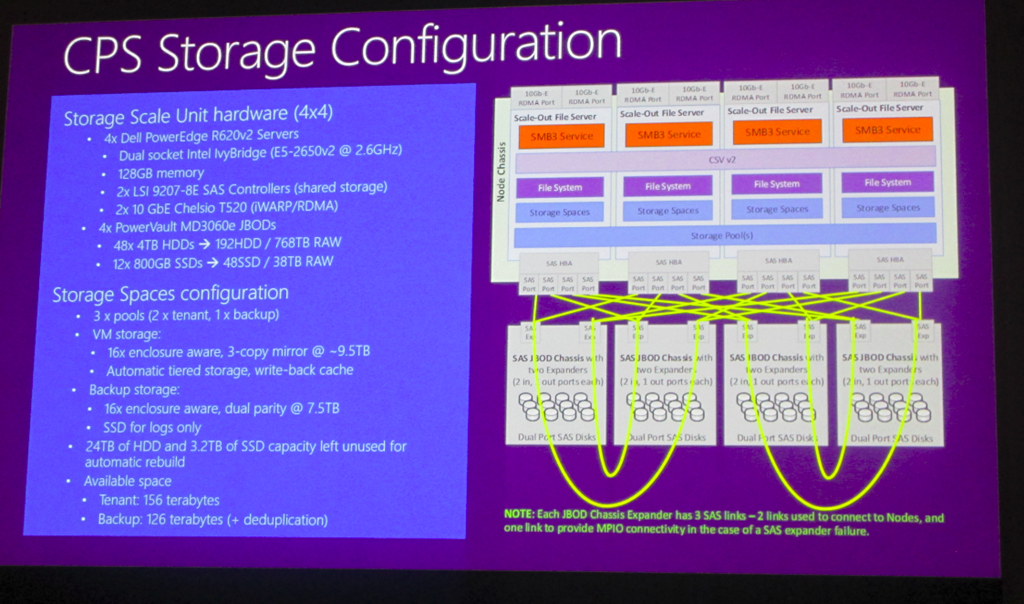
LSI HBAs and Chelsio iWARP NICs in Dell R620s with 4 enclosures:

image

Each JBOD has 60 disks with 48 x 4 TB HDDs and 12 x 800 GB SSDs. They have 3 pools to do workload separation. The 3rd pool is dual parity vDisks with dedupe enabled – used for backup.

Storage Pools should be no more an 80-90 devices on the high end – rule of thumb from MSFT.

They implement 3-way mirroring with 4 columns

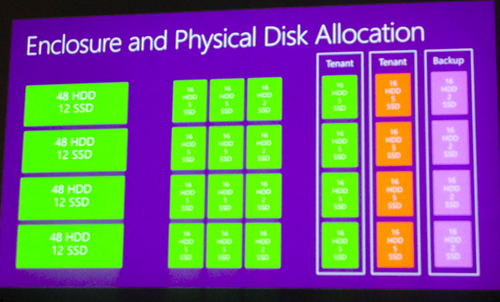
Disk Allocation

4 groups of 48 HDDs + 12 SSDs. A pool shold have equal set of disks in each enclosure.

vimage
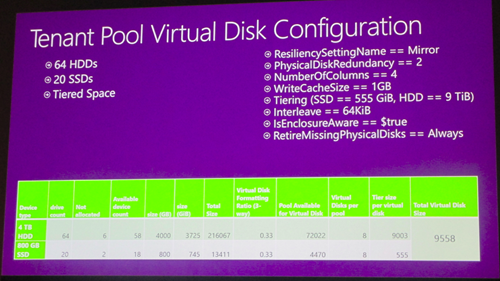
A tiered space has 64 HDDs and 20 SSs. Write cahce – 1GB Tiers = 555 GB and HDD – 9 TB. Interleave == 64 KB. Enclusre aware = $true. RetiureMissing Physical Disks = Always. Physical disk redundancy = 2 (3-way mirror). Number of columns = 2.
image

In CPS, they don’t have space for full direct connections between the SOFS servers and the JBODs. This reduces max performance. They have just 4 SAS cables instead of 8 for full MPIO. So there is some daisy chaining. They can sustain 1 or maybe 2 SAS cable failures (depending on location) before they rely on disk failover or 3-way mirroring.

TEE14–Azure Migration Accelerator and ASR Using InMage Scout

Speaker Murali KK

Business Continuity Challenges

Too many roadblocks out there:

  • Too many complications, problems and mistakes.
  • Too much data with insufficient protection
  • Not enough data retention
  • Time-intensive media management
  • Untested DR & decreasing recovery confidence
  • Increasing costs

Businesses need simpler and standardized DR. Costs are too high in terms of OPEX, CAPEX, time, and risk.

Bypassing Obstacles

  • Automate, automate, automate
  • Tigther integration between systems availablity and data protection
  • Increase bradth and depth of continuity protection
  • Eliminate the tape problem. Object? You still using punch cards?
  • Implement simple failover and testing
  • Get predictable and lower costs and operations availability

Moving into Microsoft Solutions …

There is not one solution. There are multiple solutions in the MSFT portfolio.

  • HA is built into clustering for on-premise availability on infrastructure
  • Guest OS HA can be achieved with NLB, clustering, SQL, and Exchange
  • Simple backup protection with Windows Server Backup (for small biz)
  • DPM for scalable backup
  • Integrate backup (WSB or DPM) into Azure to automate off-site backup to affordable tapeless and hugely scalable backup vaults
  • Orchestrated physical, Hyper-V, and VMware replication & DR using Azure Site Recovery. Options include on-premises to on-premises orchestration, or on-premises to Azure orchestration and failover.

image


Heterogeneous DR

Covering physical servers and VMware virtual machines. This is a future scenario based on InMage Scout.

A process server is a physical or virtual appliance deployed in the customer site. An Image  Scout data channel allows replication into the customers virtual network/storage account. A configuration server (central managemetn of scout) and master target (repository and retention) run in Azure. A multi-tenant RX server runs in Azure to manage InMage service.

How VMware to VMware Replication Works Now

This is to-on-premises replication/orchestration:

image

Demo

There are two vSphere environments. He is going to replicate from one to another. CS and RX VMs are running as VMs in the secondary site.

There is application consistency leveraging VSS. A bookmarking process (application tags) in VMs enables failover consistency of a group of servers, e.g. a SharePoint farm.

In Scout vContinuum he enters the source vSphere details and credentials. A search brings up the available VMs. Selecting a VM shows the details and allows you to select virtual disks (exclude temp/paging file disks to save bandwidth). Then he enters the target vSphere farm details. A master target (a source Windows VM) that is responsible for receiving the data is selected. The replication policy is configured. You can pick a data store. You can opt to use Raw Device Mapping for larger performance requirements. You can configure retention – the ability to move back to an older copy of the VM in the DR site (playback). This can be defined by hours, days, or a quote of storage space. Application consistency can be enabled via VSS (flushes buffers to get committed changes).

MA Offers

  • Support to migrate heterogenous workloads to Azure. Physical (Windows), Virtual and AWS workloads to Azure
  • Multi-tenant migration portal.
  • And more Smile I can’t type fast enough!

You require a site-to-site VPM or a NAT IP for the cloud gateway. You need to run the two InMage VMs (CS and MT) running in your subscription.

There was a little bit more, but not much. Seems like a simple enough solution.

I Spoke At TechEd For The First Time

Phew!

I have finally had the opportunity to speak at TechEd, TechEd Europe 2014 to be precise. My session had a looong title: From Demo to Reality: Best Practices for Deploying WS2012 R2 Hyper-V. The agenda was twofold:

  • Explain how Microsoft justifies big keynote claims about Hyper-V achievements and how they power big demos, e.g. 2 millions IOPS from a VM.
  • Discus the lesser known features of Hyper-V and related tech that can make a difference to real world consultants and engineers.

image

I had a LOT of material. When someone reviewed my deck they saw 84 slides and 10 demos and the comments were always started with: you have a lot there; are you sure you can fit it into 75 minutes. Yes I am …. now … I can fit it into just under 74 minutes Smile

All of my demos were scripted using PowerShell. I ran the script, it would pre the lab, wrote-host the cmdlets, run them, explain what was going on, get the results, and clean up the demo. I will be sharing the scripts over the coming weeks on this blog.

It was fun to do. I had some issues switching between the PPT machine and my demo laptop. And the clicker fought me at one point. But it was FUN.

image

Thank you to everyone who gave me feedback, who supported me, who advised me, and to those who helped. A special mention to Ben, Sarah, Rick, Joey, Mark, Didier, and especially Nicole.

TEE14–PowerShell Unplugged

Speaker: Jeffrey Snover, uber genius, Distinguished Engineer, and father of PowerShell.

Tale of 3 Parents

  • UNIX: Small unit composition with pipes: A | B | C. Lacks consistency and predictability.
  • VMS/DCL: The consistent predictable nature impacted Jeffrey. Verb & noun model.
  • AS400/CL: Business oriented – enable people to do “real business”.

Keys to Learning PowerShell

  • Learn how to learn: requires a sense of exploration. I 100% agree. That’s what I do: explore the cmdlets and options and properties of objects.
  • Get-Help and Update-Help. The documentation is in the product. The help is updated regularly.
  • Get-Command and Show-Command
  • Get-Member and Show-Object –> the latter is coming.
  • Get-PSDrive HOw hierarchical systems like  drives are explored.

Demo

Into ISE to do some demo stuff.

He uses a OneGet and PowerShellGet modules to pull down modules from trusted libraries on the Internet (v5 from vNext).

Runs Show-Object to open a tree explorer of a couple of cmdlets.

Dir variable …. explore the virtual variable drive to see the already defined variables available to you.

$c = get-command get-help

get-object $c

$c.parameters

$c.parameters.path

get-command –noun disk

Get-something | out-gridview

Get-Help something –ShowWindow

$ConfirmPreference = “Low”

TEE14 – Software Defined Storage in Windows Server vNext

Speaker: Siddhartha Roy

Software-Defined Storage gives you choice. It’s a breadth offering and unified platform for MSFT workloads and public cloud scale. Economical storage for private/public cloud customers.

About 15-20% of the room has used Storage Spaces/SOFS.

What is SDS? Cloud scale storage and cost economics on standard, volume hardware. Based on what Azure does.

Where are MSFT in the SDS Journey Today?

In WS2012 we got Storage Spaces as a cluster supported storage system. No tiering. We could build a SOFS using cluster supported storage, and present that to Hyper-V hosts via SMB 3.0.

  • Storage Spaces: Storage based on economical JBOD h/w
  • SOFS: Transparent failover, continuously available application storage platform.
  • SMB 3.0 fabric: high speed, and low latency can be added with RDMA NICs.

What’s New in Preview Release

  • Greater efficiency
  • More uptime
  • Lower costs
  • Reliability at scale
  • Faster time to value: get customers to adopt the tech

Storage QoS

Take control of the service and offer customers different bands of service.

image

Enabled by default on the SOFS. 2 metrics used: latency and IOPS. You can define policies around IOPS by using min and max. Can be flexible: on VHD level, VM level, or tenant/service level.

It is managed by System Center and PoSH. You have an aggregated end-end view from host to storage.

Patrick Lang comes on to do a demo. There is a file server cluster with 3 nodes. The SOFS role is running on this cluster. There is a regular SMB 3.0 file share. A host has 5 VMs running on it, stored on the share. One OLTP VM is consuming 8-10K IOPS using IOMETER. Now he uses PoSH to query the SOFS metrics. He creates a new policy with min 100 and max 200 for a bunch of the VMs. The OLTP workload gets a policy with min of 3000 and max of 5000. Now we see its IOPS drop down from 8-10K. He fires up VMs on another host – not clustered – the only commonality is the SOFS. These new VMs can take IOPS. A rogue one takes 2500 IOPS. All of the other VMs still get at least their min IOPS.

Note: when you look at queried data, you are seeing an average for the last 5 minutes. See Patrick Lang’s session for more details.

Rolling Upgrades – Faster Time to Value

Cluster upgrades were a pain. They get much easier in vNext. Take a node offline. Rebuild it in the existing cluster. Add it back in, and the cluster stays in mixed mode for a short time. Complete the upgrades within the cluster, and then disable mixed mode to get new functionality. The “big red switch” is a PoSH cmdlet to increase the cluster functional level.

image

Cloud Witness

A third site witness for multi-site cluster, using a service in Azure.

image

Compute Resiliency

Stops the cluster from being over aggressive with transient glitches.

image

Related to this is quarantine of flapping nodes. If a node is in and out of isolation too much, it is “removed” from the cluster. The default quarantine is 2 hours – give the admin a chance to diagnose the issue. VMs are drained from a quarantined node.

Storage Replica

A hardware agnostic synchronous replication system. You can stretch a cluster with low latency network. You get all the bits in the box to replicate storage. It uses SMB 3.0 as a transport. Can use metro-RDMA to offload and get low latency. Can add SMB encryption. Block-level synchronous requires <5MS latency. There is also an asynchronous connection for higher latency links.

image

The differences between synch and asynch:

image

Ned Pyle, a storage PM, comes on to demo Storage Replica. He’ll do cluster-cluster replication here, but you can also do server-server replication.

There is a single file server role on a cluster. There are 4 nodes in the cluster. There is assymetric clustered storage. IE half the storage on 2 nodes and the other half on the other 2 nodes. He’s using iSCSI storage in this demo. It just needs to be cluster supported storage. He right-clicks on a volume and selects Replication > Enable Replication … a wizard pops up. He picked a source disk. Clustering doesn’t do volumes … it does disks. If you do server-server repliction then you can replicate a volume. Picks a source replication log disk. You need to use a GPT disk with a file system. Picks a destination disk to replicate to, and a destination log disk. You can pre-seed the first copy of data (transport a disk, restore from backup, etc). And that’s it.

Now he wants to show a failover. Right now, the UI is buggy and doesn’t show a completed copy. Check the event logs. He copies files to the volume in the source site. Then moves the volume to the DR site. Now the replicated D: drive appears (it was offline) and all the files are there in the DR site ready to be used.

After the Preview?

Storage Spaces Shared Nothing – Low Cost

This is a no-storage-tier converged storage cluster. You create storage spaces using internal storage in each of your nodes. To add capacity you add nodes.

You get rid of the SAS layer and you can use SATA drives. The cost of SSD plummets with this system.

image

You can grow pools to hundreds of disks. A scenario is for primary IaaS workloads and for storage for backup/replication targets.

There is a prescriptive hardware configuration. This is not for any server from any shop. Two reasons:

  • Lots of components involved. There’s a lot of room for performance issues and failure. This will be delivered by MSFT hardware partners.
  • They do not converge the Hyper-V and storage clusters in the diagram (above). They don’t recommend convergence because the rates of scale in compute and storage are very different. Only converge in very small workloads. I have already blogged this on Petri with regards to converged storage – I don’t like the concept – going to lead to a lot of costly waste.

VM Storage Resiliency

A more graceful way of handling a storage path outage for VMs. Don’t crash the VM because of a temporary issue.

image

CPS – But no … he’s using this as a design example that we can implement using h/w from other sources (soft focus on the image).

image

Not talked about but in Q&A: They are doing a lot of testing on dedupe. First use case will be on backup targets. And secondary: VDI.

Data consistency is done by a Storage Bus Layer in the shared notching Storage Spaces system. It slips into Storage Spaces and it’s used to replicate data across the SATA fabric and expands its functionality. MSFT thinking about supporting 12 nodes, but architecturally, this feature has no limit in the number of nodes.

Next Generation Networking–SDN, NFV & Cloud-Scale Fundamentals

I am live blogging. My battery is also low so I will blog as long as possible (hit refresh) but I will not last the session. I will photograph the slides and post later when this happens.

Speakers: Bala Rajagopalan & Rajeev Nagar.

The technology and concepts that you will see in Windows Server vNext come from vNext where they are deployed, stressed and improved at huge scales, and then we get that benefit of hyper-scale enterprise grade computing.

Traditional versus Software-Defined Data Centre

Traditional:

  • Tight coupling between infrastructure and services
  • Extensive proprietary and vertically integrated hardware
  • Siloed infrastructure and operations
  • Highly customized processes and configurations.

Software-Defined Datacenter:

  • Loosely couple
  • Commodity industry standard hardware
  • Standarized deployments
  • Lots of automation

Disruptive Technologies

Disaggerated s/w stack + disaggregation of h/w + capable merchant (commonly available) solution.

Flexibility limited by hardware defined deployments. Blocks adoption of non-proprietary solutions that can offer more speed. Slower to deploy and change. Focus is on hardware, and not on services.

Battery dying …. I’ll update this article with photos later.