KB2846340 – Duplicate Friendly Names Of NICs Displayed In Windows

This KB applies to Windows Vista and Windows Server 2008 up to Windows 8 and Windows Server 2012. There’s no mention of Hyper-V, but considering that hosts have lots of NICs, it seemed relevant to me. The scenario is when duplicate friendly names of network adapters are displayed in Windows.

Symptoms

Consider the following scenario:

  • You have one or more network adapters installed on a computer that is running one of the following operating systems:
    • Windows Vista
    • Windows Server 2008
    • Windows 7
    • Windows Server 2008 R2
    • Windows 8
    • Windows Server 2012
  • The display names of the network adapters are changed. For example, the device driver is updated.
  • You add new network adapters to the computer. The new network adapters are of the same make and model as the original network adapters.

In this scenario, duplicate friendly names of the original network adapters are displayed in Device Manager.
For example, you have two network adapters installed on a computer. Before you update the driver, Device Manager shows the following:

  • <Network adapter name>
  • <Network adapter name> #2

After the driver is updated, the names of the network adapters are changed to the following in Device Manager:

  • <Network adapter new name>
  • <Network adapter new name> #2

After you add new network adapters that are of the same make and model, Device Manager shows the following:

  • <Network adapter new name>
  • <Network adapter new name> #2
  • <Network adapter new name> #3
  • <Network adapter new name> #4
  • <Network adapter new name> #5
  • <Network adapter new name> #6
  • <Network adapter new name>
  • <Network adapter new name> #2

In this scenario, Device Manager displays duplicate friendly names of the original network adapters.

A hotfix is available to resolve this issue.

Employers Are Clueless About Hiring IT Staff

You’d think that after all these years, considering how critical and pervasive IT has become, that employers would understand that:

  • IT is complex: there is more to IT services and infrastructure than clicking Install in an app store.
  • No one person can know everything: Hell, no one person can know all of System Center!!!! (You hear that Microsoft certification process managers?!?!?!)
  • Good people are required: There are lots of “cowboys” out there who can do a shit job, but you need good people to do a good job.
  • Good people are rare, and therefore expensive: You’d think that business people would understand the rules of supply and demand.

But, it appears that lessons have not been learned.

Exhibit A:

Here’s a tweet from earlier today by MVP Didier Van Hoye:

image

Yes, some employer wants a person with little to no experience to decide and plan the future of their IT, and therefore the ability of their business to function. That’s smart … no … that’s moronic.

Exhibit B:

Some company (I haven’t bothered to figure out who yet) in Dublin (Ireland) is recruiting for a cloud consultant. I was spam-emailed last week, I’ve seen adverts on LinkedIn, and I’ve been cold called by head hunters. This employer is seeking a unicorn, bigfoot, or abominable snowman type of creature. They want a consultant who knows EVERYTHING:

  • Hyper-V, vSphere, etc
  • System Center, VMware’s suite, etc
  • Hardware and storage
  • AWS
  • Azure
  • I think there also might have been some networking stuff in the laundry list

And that person will earn the princely sum of €55K per year. Firstly, this person does not exist. Secondly, €55K is the going rate for a mid-level consultant that has a few of those skills.

The world still needs to learn that IT pro staff are not glorified cleaners. It’s not like we can go to college for 2 years to learn how to balance or cook the books and we’re set for the rest of our careers.

KB2925727 – Unknown Device (VMBUS) In Device Manager In Virtual Machine For WS2012 R2 AVMA

Automatic Virtual Machine Activation (AVMA) is the one Hyper-V feature in the Datacenter edition of Windows Server that you won’t find in the other versions (Standard or Hyper-V Server). This is a technical feature than enables a licensing feature. Hosts that are licensed with the Datacenter edition are entitled to host as many VM installations of Windows Server as you are able to get on to that licensed physical machine. The complication for larger or hosting companies is activating the installations: firewalls and NVGRE network virtualization (SND or software-defined networking) makes routing to Microsoft’s clearing house or a KMS a little difficult. So Microsoft allows you to activate the host, and install AVMA keys into the guest OS of your template virtual machines.

Microsoft has published a KB article that is related to a funny you might see in your virtual machines that is related to AVMA. 

Symptoms

On a Windows Server 2012 R2 Datacenter Hyper-V host, you may see 2 unknown device under Other Devices in device manager of any virtual machine running operating systems earlier than Windows Server 2012 R2.
If you view the properties of these devices and check driver details, Hardware IDs or Compatible IDs, they will show the following:

  • vmbus{4487b255-b88c-403f-bb51-d1f69cf17f87}
  • vmbus{3375baf4-9e15-4b30-b765-67acb10d607b}
  • vmbus{99221fa0-24ad-11e2-be98-001aa01bbf6e}
  • vmbus{f8e65716-3cb3-4a06-9a60-1889c5cccab5}

Cause

These Virtual Devices (VDev) are provided for Automatic Virtual Machine Activation (AVMA) to communicate with the host. AVMA is only supported on virtual machines running Windows Server 2012 R2 or later versions of operating systems.

According to Microsoft the unknown devices are “harmless and can be ignored”. Hosting companies might want to add this one to their customer knowledgebase. In my experience, this is one of those little annoying things that will create annoying and time consuming helpdesk calls.

UR1 For System Center 2012 R2 Is Available – Be Careful

Microsoft has released Update Rollup 1 for System Center 2012 R2, covering everything except Endpoint Protection and Configuration Manager (they’re almost a separate group).

As usual with update rollups, I would caution you to let others download, install, and test this rollup. Don’t approve it for deployment for another month. And even then, make sure you read each product’s documentation before doing an installation.

Those who lived through URs over the last 12-18 months will remember that System Center had as bad, if not worse, time than Windows Server 2012 with these Update Rollups.

EDIT:

Update Rollup 5 for System Center 2012 Service Pack 1 was also released. The same advice applies; don’t deploy for 1 month and let others be the guinea pigs.

Internet Explorer 11 Freezes With “Your Last Browsing Session Closed Unexpectedly” (Workaround)

I’m in an IE hating kind of mood this week. For no reason, IE11 decided to die on my new laptop on Thursday. That’s forced me back into the hands of Google (I find Firefox to be the worst to use of the 3 big browsers).

What’s happening? When I open IE11 it comes up with “Your last browsing session closed unexpectedly”. And then it locks up. I’ve reset IE and I’ve deleted all items. I’ve disabled all plugins and no joy.

One thing I found was interesting: I reset the home page to the default. IE opens just fine then. But try to browse to a page and it freezes before the page can load. It’s as if the rendering of the page is causing the issue.

A nice suggestion I got via twitter from Tero Alhonen was to:

  1. Disable Browser sync via PC Settings > SkyDrive > Sync Settings
  2. Uninstall IE from Programs & Features > Windows Features
  3. Reboot
  4. Reinstall IE
  5. Reboot
  6. Re-test

Why try this? Because a new test user on the same machine has no issues.

No joy.

I have also tried removing and recreating my user. That, in my opinion, is going too far to fix this issue, and although I could go to some extremes down this path, I am not willing to do so. Why the frak should I? A browser should just damned well work.

BTW, I have found plenty of people on forums having the same issue for months. A few seem to have resolved their issue by installing a new NVIDIA graphics driver. My Yoga’s devices are up to date and it has a Intel HD graphics.

So IE11 is now dead (literally) to me. And MSFT wonders why Win8x isn’t doing well ….

EDIT:

A quick update. Most sites will not load, e.g. Bing or Google. Some (a very few) load slowly, e.g. independent.ie. This leads me to think that there is a rendering issue in IE11 that is specific to my user profile, and was synced in via Skydrive.

EDIT 2:

Tero came back to me with another idea. Disable GPU rendering in the advanced IE settings. I opened up Internet Options in Control Panel and checked Use Software Rendering Instead Of GPU Rendering. I started up IE and pages are opening as expected. Thanks Tero!

image

How Microsoft Windows Build Team Replaced SANs with JBOD + Windows Server 2012 R2

I’ve heard several times in various presentations about a whitepaper by Microsoft that discusses how the Windows build team in Microsoft HQ replaced traditional SAN storage (from a certain big name storage company) with Scale-Out File Server architecture based on:

  • Windows Server 2012 R2
  • JBOD
  • Storage Spaces

I searched for this whitepaper time and time again and never found it. Then today I was searching for a different storage paper (which I have yet to find) but I did stumble on the whitepaper with the build team details.

The paper reveals that:

  • The Windows Build Team were using traditional SAN storage
  • They needs 2 petabytes of storage to do 40,000 Windows installations per day
  • 2 PB was enough space for just 5 days of data !!!!
  • A disk failure could affect dozens of teams in Microsoft

They switched to WS2012 R2 with SOFS architectures:

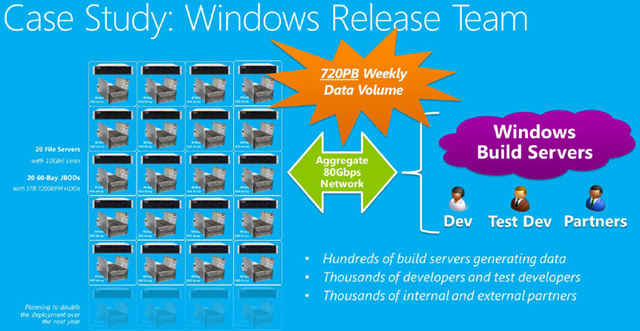
  • 20 x WS2012 R2 clustered file servers provide the SOFS HA architecture with easy manageability.
  • 20 x  JBODs (60 x 3.5″ disk slots) were selected. Do the maths; that’s 20 x 60 x 4 TB = 4800 TB or > 4.6  petabytes!!! Yes, the graphic says they are 3 TB drives but the text in the paper says the disks are 4 TB.
  • There is an aggregate of 80 Gbps of networking to the servers. This is accomplished with 10 Gbps networking – I would guess it is iWARP.

The result of the switch was:

  • Doubling of the storage throughput via SMB 3.0 networking
  • Tripling of the raw storage capacity
  • Lower overall cost – reduced the cost/TB by 33%
  • In conjunction with Windows Server dedupe, they achieved 5x increase in capacity wutg 45-75% de-duplication rate.
  • This lead to data retention going from 5 days to nearly a month.
  • 8 full racks of gear were culled. They reduced the server count by 6x.
  • Each week 720 petabytes of data flows across this network to/from the storage.

image

Check out the whitepaper to learn more about how Windows Server 2012 R2 storage made all this possible. And then read my content on SMB 3.0 and SOFS here (use the above search control) and on The Petri IT Knowledgebase.

FreeBSD Has Built-In Guest OS Support For Hyper-V – Please Note The Wording!

Microsoft’s Jeff Woolsey just tweeted about a new release of FreeBSD that has built-in support for running as a guest operating system in a Hyper-V virtual machine.

image

The release notes for FreeBSD Release 10.0 say:

Major enhancements in virtualization, including the addition of bhyve(8), virtio(4), and native paravirtualized drivers providing support for FreeBSD as a guest operating system on Microsoft Hyper-V.

According to the FreeBSD Wiki, the following Hyper-V features are added to FreeBSD 10.0:

  • Support for integrated shutdown from Hyper-V console.
  • Support for keeping time synchronized between FreeBSD guest and Hyper-V host.
  • Support for Hyper-V specific IDE and SCSI storage devices.
  • Support for Hyper-V specific network adapter.
  • Live migration with and without static IP migration. Note that to enable static IP migration, administrators will need to include the KVP driver and daemon available in FreeBSD 10.0 ports for Hyper-V.

There are also some workarounds to a couple of issues:

  • The Hyper-V integration services are not activated in i386 release of FreeBSD 10.0 due to an oversight during the development process.
  • Device names may change once the Hyper-V storage integration service is installed on FreeBSD.

Now I know what’s going to happen here, because it happened before when the FreeBSD community said that this support was coming. NO ONE with authority has publicly said that Microsoft supports FreeBSD yet, as far as I know. Until then, please ignore any tweets or press reports that claim that Hyper-V supports FreeBSD. The way I read it is that FreeBSD is supporting being used on Hyper-V, and not the other way around. Look at the wording carefully.

What does that mean? FreeBSD probably works great as a guest OS installed into a Hyper-V VM. But if you have an issue with the guest OS’s stability or performance then take it up with the FreeBSD community because Hyper-V does not support FreeBSD.

That won’t change until there is an announcement on a formal Microsoft blog such as Ben Armstrong’s one, the Virtualization Team blog, the Openness Blog, or the Server & Cloud blog. Otherwise, please ignore any claims that Hyper-V supports FreeBSD, even if it says microsoft.com in the URL – I’m being serious about that. Some of the MSFT bloggers and DPEs got carried away with misinterpreting the previous development announcement. Until you see one of the aforementioned blogs clearly saying that “Hyper-V supports FreeBSD” (in that order, not FreeBSD supports Hyper-V) or it’s posted in the official list of supported guest OSs, then FreeBSD is not a supported guest OS on Hyper-V.

On a positive note, this development does open up some interesting possibilities. A number of appliances are based on FreeBSD, including NetApp (Data ONTAP) who I believe were one of the players behind this support. You’ll also see a number of security and networking solutions in the list. Wouldn’t it be nice to see some Hyper-V appliances appearing?!

Technorati Tags: ,

Back To School 2015 – Windows 9

The company I work for is a distributor. We sell Microsoft licensing (retail, OEM, volume licensing), retail and business laptops, Apple, and much more. Every summer I see how busy our Apple sales folks get. Back-to-school is a huge season for them and Apple recognises this by getting product out in time for the shopping spree.

Meanwhile, Microsoft has been doing general availability releases in October, completely missing the season when parents go spend crazy on their precious darlings. Microsoft has effectively halved their seasons by only catching Christmas. Apple gets both the summer buzz and the winter holidays. Sure, Microsoft has gotten lots of biz from €400 laptops in this season, but we know how much that market has been shrinking thanks to the constant IDC headlines.

We know now that “Windows 9” (codename “threshold”) is coming out in April 2015 (or thereabouts). I suspect that is an RTM date. GA will probably be the end of May or start of June. That’s a good thing.

The releases of Windows 8 and Windows 8.1 have shown us that the interval between RTM and GA is not enough for OEMs to get product out onto shelves. We’ve seen October GAs and previously announced stuff has taken 4-6 months to appear in the retail channel where customers can buy it. I suspect there are two factors in the delay:

  • OEMs are slow to build and ship
  • Retailers are focusing on clearing old stock before ordering next generation stock

For Microsoft and the willing consumer that is a lose-lose perfect storm.

With GA possibly in June, that gives the channel a chance to get stock out in the market by August, the sweet spot in the back-to-school market, and even longer for products to mature for the Christmas shopping season (November onwards).

If this is what happens then I would hope that Microsoft sticks to April RTM dates.

Technorati Tags: ,

Hyper-V Recovery Manager Is Generally Available – The Pros & The Cons

Microsoft announced the general availability of Hyper-V Recovery Manager (HRM) overnight. HRM is an Azure-based subscription service that allows you manage and orchestrate your Hyper-V Replica disaster recovery between sites.

As you can see in the below diagram, HRM resides in Azure. You have an SCVMM-managed cloud in the primary site.  You have another SCVMM-managed cloud in a secondary site; yes, there is a second SCVMM installation – this probably keeps things simple to be honest. Agents are downloaded from HRM to each SCVMM install to allow both SCVMM installations to integrate with HRM in the cloud. Then you manage everything through a portal. Replication remains direct from the primary site to the secondary site; replication traffic never passes through Azure. Azure/HRM are only used to manage and orchestrate the process.

There is a big focus on failover orchestration in HRM, including the ability to tier and build dependencies, just as real-world applications require.

I’ve not played with the service yet. I’ve sat through multiple demos and read quite a bit. There are nice features but there is one architectural problem that concerns me, and an economic issue that Microsoft can and must fix or else this product will go the way of Google Reader.

Pros

  • Simple: It’s a simple product. There is little to set up (agents) and the orchestration process has a pretty nice GUI. Simple is good in these days of increasing infrastructure & service complexity.
  • Orchestration: You can configure nice and complex orchestration. The nature of this interface appears to lend itself to being quite scalable.
  • Failover: The different kinds of failover, including test, can be performed.

Cons

  • Price: HRM is stupid expensive. I’ve talked to a good few people who knew about the pricing and they all agreed that they wouldn’t pay €11.92/month per virtual machine for an replication orchestration tool. That’s €143.04 per year per VM – just for orchestration!!! Remember that the replication mechanism (Hyper-V Replica) is built-in for free into Hyper-V (a free hypervisor).
  • Reliance on System Center: Microsoft touts the possibility of hosting companies using HRM in multi-tenant DR services. Let’s be clear here; the majority of customers that will want a service like this will be small-to-medium enterprises (SMEs). Larger enterprises will either already have their own service or have already shifted everything into public cloud or co-location hosting (where DR should already exist). Those SMEs mostly have been priced out of the System Center market. That means that service providers would be silly to think that they can rely on HRM to orchestrate DR for the majority of their customers – the many small ones that need the most automation because of the high engineering time versus profit ratio.
  • Location! Location! Location!: I need more than a bullet point for this most critical of problems. See below.

I would never rely on a DR failover/orchestration system that resides in a location that is outside of my DR site. I can’t trust that I will have access to that tool. Those of us who were working during 9/11 remember what the Internet was like – yes, even 3000 miles away in western Europe; The Internet ground to a halt. Imagine a disaster on the scale of 9/11 that drew the same level of immediate media and social interest. Now imagine trying to invoke your business continuity plan (BCP) and logging into the HRM portal. If the Net was stuffed like it was on 9/11 then you would not be able to access the portal and would not be able to start your carefully crafted and tested failover plan. And don’t limit this to just 9/11; consider other scenarios where you just don’t have remote access because ISPs have issues or even the Microsoft data centre has issues.

In my opinion, and I’m not alone here, the failover management tool must reside in the DR site as an on-premise appliance where it can be accessed locally during a disaster. Do not depend on any remote connections during a disaster. Oh; and at least halve the price of HRM.

BBC News Incorrectly Reporting That Support For Windows XP Was Extended

I just got called over by a panicking sales person in the office who had been reading the BBC News site. The BBC incorrectly reported that Microsoft was extending support and patching for Windows XP, beyond the end date of April 8th (also the end of support for Office 2003).

Let me repeat this:

Support for Windows XP and Office 2003 ENDS on April 8th, 2014


There will be no changes to this, no matter what some clueless intern in the BBC news department might have imagined up.

The story links to an announcement by Microsoft that clarifies that support for Microsoft antivirus products on Windows XP will continue through to July 14, 2015. Some people will continue to use Windows XP beyond the end of support date and Microsoft will be providing them with a minimum level of security. They’ll still be vulnerable to attack via vulnerabilities that will be patched on Windows Vista and newer, but still exist in Windows XP.

Another ZDNet blogger (some beardy dude I never heard of) was complaining that Microsoft will continue to allow people to activate Windows XP. I’m not even going to link to that click-bait article because it doesn’t deserve it. Of course activations will continue. People bought the product, still own it, and still have the legal right to use it.

Geez! There really are only two tech journalists out there: Paul Thurrott and Mary Jo Foley.