Geez, Buying a Smart Phone is … Complicated

Forgetting plans and contracts, just picking a device is a royal pain in the behind.  I’m looking at a bunch of devices, one of which I’d buy next week in New Orleans (factory unlocked):

Apple iPhone 5

I’ve been using the iPhone 4 for 2.5 years (with a 2 week fling with a Nokia Lumia 820).  I fancy … a change.  Maybe IOS7 will bring change, and maybe not.  I’m not that invested in the platform.

Samsung Galaxy S4

It’s probably the best handset on the market.  It’s a pity Samsung put so many cr-apps into the OS that can’t be removed.  To make it worse, you can’t move apps to the SD card.  Only 16 GB models are available, and only 9 GB of that space is usable.  This would be my handset of choice … but this storage space thing is a concern.

HTC One M7 32 GB

This handset has some very good reviews.  There’s plenty of capacity.  The camera, although low MP, also gets good reviews … but I use a DSLR for those occasions when I want a good photo Smile  The UI has some issues apparently.

Sony Xperia Z

Some of the guys in the office have and love this one.  My concern are the reviews that say the screen doesn’t behave well in bright light or from a slight angle.

Nokia Lumia 920

I can’t get an unlocked 925 or 928, so that leaves the 920.  I had an 820 for 2 weeks before giving it to a friend.  The battery in the 820 was … poor.  The 920 is heavy, but solid.  The screen is super.  The OS … is WP8.  Hmm. 

Basically, I am torn.  The safe and boring choice is the iPhone 5.  The follow-the-crowd choice is to get the S4.  The daring choice is a Lumia 920 or the HTC One M7.

Or … do I wait until later in the year when Google releases a Samsung S4 with the base Android OS and no cr-apps?

Technorati Tags:

Windows Azure Powered By Hyper-V

I was just reading MMS 2013 Labs: Powered by Microsoft/HP Private Cloud by Jeff Woolsey (senior Hyper-V program manager in MSFT) and I saw this hidden away at the end:

Finally, I’ve been talking about Windows Server and System Center as part of our Microsoft Private Cloud Solution. I’d also like to point out that Windows Server 2012 Hyper-V is the same rock-solid, high performing and scalable hypervisor we use to power Windows Azure too.

Read that again.

That’s right. Windows Azure is powered by Windows Server 2012 Hyper-V.

Yes, Hyper-V is the virtualization layer in Windows Azure.  Imagine all those servers, powering Windows and Linux VMs, in a huge and mission critical environment.  To the jokers out there:

  • Does VMware power a cloud of that size?
  • Does Amazon’s custom Xen have that level of uptime (Virginia anyone?  Would Netflix care to respond?)

Yeah, try your “Hyper-V isn’t scalable”, “Hyper-V isn’t enterprise ready”, or “Hyper-V isn’t stable” arguments now!

How ‘bout them Cloud OS apples?

TechEd North America – Speaker Idol

Not only am I attending TechEd North America next week, but I will also be competing in Speaker Idol

.NET Rocks) host the Speaker Idol competition where contestants give a five-minute presentation in front of an audience and a panel of esteemed judges. The grand prize is a speaking slot at next year’s TechEd! Come to the Digital Wall each day during lunch to see who could be speaking at TechEd next year—and learn something new!

I will have 5 minutes to talk about some technical subject.  The winner of each heat moves on to the final, and the winner of the final wins the coveted speaking spot at TechEd the following year.  I’m scheduled for lunchtime on Monday … come and cheer me on!  It’s either going to be pretty cool or pretty horrific Smile

Technorati Tags: ,

Carsten Rachfahl (Hyper-V MVP) Interviews Mark Minasi About PowerShell

Carsten Rachfahl (@hypervserver) is at it again; he’s just published a video interview with Mark Minasi (@mminasi), the famed journalist, author, speaker, trainer, consultant and Directory Services MVP.  This time, the topic is the importance of PowerShell to the admin and why they should learn this scripting language.

Videointerview mit Mark Minasi über PowerShell-thumb1

Don’t worry; the page with the video link is auf Deutch but the video is in English.

My Recent Posts on Petri IT Knowledgebase (May 2013)

Below are the blog posts and articles that I have written for the Petri IT Knowledgebase over the past few weeks, covering topics like Hyper-V storage, Hyper-V snapshots, the Microsoft Cloud OS, and VMM 2012 SP1:
 
System Center Virtual Machine Manager 2012 SP1: System Requirements

May 22, 2013

Review the system requirements of Microsoft’s System Center 2012 Service Pack 1 Virtual Machine Manager.

Planning Hyper-V Virtual Machine Storage

May 21, 2013

Discover the many considerations when configuring storage for a Hyper-V virtual machine.

Microsoft Cloud OS: An Overview

May 20, 2013

Discover the ins and outs of cloud computing and learn how Microsoft has made a cloud OS with Windows Server 2012 and System Center 2012 SP1.

Using Hyper-V Snapshots

May 15, 2013

It’s a new Ask an Admin! Discover how to create, manage, and delete Hyper-V Snapshots.

How Hyper-V Snapshots Work

May 13, 2013

Ever wondered how Hyper-V snapshots work? Wonder no more as we go take a walk through how snapshots work and mistakes to avoid.

Hyper-V Snapshots: What, When, and Why

May 8, 2013

What is a Hyper-V snapshot? Read this Ask an Admin for an introduction to Hyper-V snapshots and when you should consider using them.

Choosing Hyper-V Storage: Virtual Hard Disks

May 7, 2013

Looking at Hyper-V storage options? Discover the pros and cons of business friendly, cloud-enabled, virtual hard disks.

Capacity Planner for Hyper-V Replica

How much WAN bandwidth will I need for Hyper-V Replica?  How much disk space will I need?  What will be the IOPS impact on the secondary host if I keep historical copies/snapshots of my VMs?  Are there any CPU or memory requirements for the hosts?  Microsoft has released a Hyper-V Replica (HVR) capacity planning guide and tool/utility to answer those questions.  The Virtualization Blog states:

The answer to the above and many other capacity planning questions is “It depends” – it depends on the workload, it depends on the IOPS headroom, it depends on the available storage etc. While one can monitor every single perfmon counter to make an informed decision, it is sometimes easier to have a readymade tool.

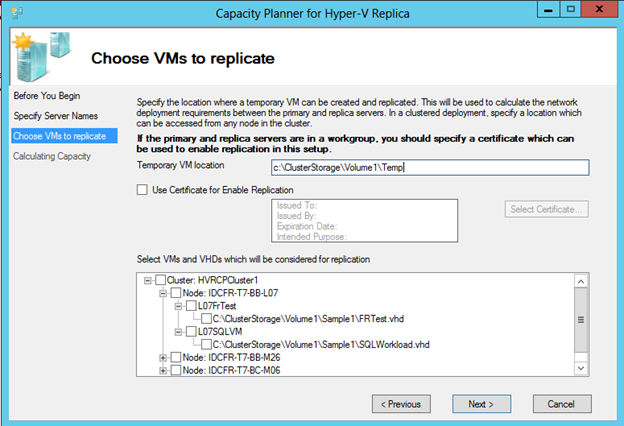
The Capacity Planner for Hyper-V Replica which was released on 5/22, allows you to plan your Hyper-V Replica deployment based on the workload, storage, network and server characteristics. The guidance is based on results gathered through our internal testing across different workloads.

What you should do:

  1. Download the document and tool
  2. Read the documentation
  3. Use the tool

image

The way it works is:

  1. You configure a secondary site to receive replication (SSL replication is supported, as you can see in the above screenshot)
  2. You run and configure the tool to run some tests
  3. You select the virtual machines to consider in the tests
  4. The planner sends a test VHD to the secondary site to test the connection and metrics are gathered (this lasts a few minutes longer than the configured test duration)
  5. A report is stored in "%systemdrive%UsersPublicDocumentsCapacityPlanner with information on the VMs and primary/secondary host impact (CPU, RAM, IOPS, Storage) and Network.

image

Notes:

  • The tool is free.  USE IT
  • No data is collected from the guest OS.  This tool, like Hyper-V Replica replication, works at the host level.
  • The tool does not do physical server replication forecasting.  It works with HVR.
  • You should not use the tool with VMs that are already replicating.
  • The tool does not configure HVR – it’s a metrics gathering and forecasting tool.


Looking Forward To TechEd North America 2013

I have a busy schedule on at the moment.  This week I’m delivering a 2 day VMM course in Dublin, prepping a custom 3-day hands-on ConfigMgr course for next week, recording a “webcast” on Windows 8 in the business.  Next week I deliver the aforementioned ConfigMgr course, and then travel to Copenhagen for the E2EVC conference where I’m doing the Microsoft virtualization/cloud keynote.  And then at sunrise on that Sunday, I fly from Copenhagen to New Orleans for TechEd North America 2013.

I had a choice of conferences this year.  I didn’t fancy MMS 2013 because it was at the wrong point in the lifecycle of System Center.  And to be honest, I found last year’s MMS to be more of a “here’s what you can do” rather than a “here’s how to do it”.  This was valuable to me because I was new to things like Orchestrator, and Service Manager (I still am).  This year, I wanted a more level 300/400 event.  That leaves TechEd North America (New Orleans, LA), and TechEd Europe (Madrid) a few weeks later in June.  I opted for the NA event because:

  • That’s, if it happens before Build as many suspect, where “Blue” will be revealed – bits aren’t being shared until the Build week at the end of June
  • The American speakers usually feature more product group members than the Europe conference – where too many local marketeers get to speak.  I really value what the experts share.  Go listen to folks like Claus Joergensen talk about storage in previous years.
  • Even with the higher flight costs, TechEd NA is much cheaper than TechEd Europe

I’m looking forward to the event a lot.  Folks like Didier Van Hoye have blogged about the value of this event.  This is where we go to learn about possibilities.  In recent years, we’ve seen the return of deep tech sessions – much of what I’ve written or spoken about I’ve learned from TechEd sessions.

It’s been a while since I’ve done TechEd.  In the last 2 years I’ve stayed at home and watched the keynotes live and the sessions 24-36 hours later on the Channel 9 website. That is good, but there’s a value to being there in person:

  • No work distractions
  • You get to meet the experts in the halls or after the sessions
  • You can ask questions – try asking an AVI file a question Smile
  • And the networking opportunities are invaluable too.

This year will be a strange one for me.  The Petri IT Knowledgebase has arranged a press pass for me.  So, I’ll be an attending MVP (not doing a booth) and a member of the media!  Another first for me will be that my publisher is arranging a book signing for one of the lunch breaks.  I feel weird signing a book for just one person (I’m no celebrity) so doing a book signing will be peculiar … I hope no one asks me to sign their boobs … think about who attends tech conferences and you’ll get my meaning Open-mouthed smile

If you see a jetlagged, sweaty, overweight, Irish dude with really bad jetlag, wandering the halls of TechEd in 2 weeks, then that’ll be me.

Technorati Tags:

6 Months Of Owning Samsung ATIV SmartPC Windows 8 Tablet

It is just over 6 months since I got my Samsung ATIV Smart PC 500T.  This is an Intel Atom powered device with 64 GB onboard storage (added 64 GB via MicroSD) running Windows 8 (not Windows RT).
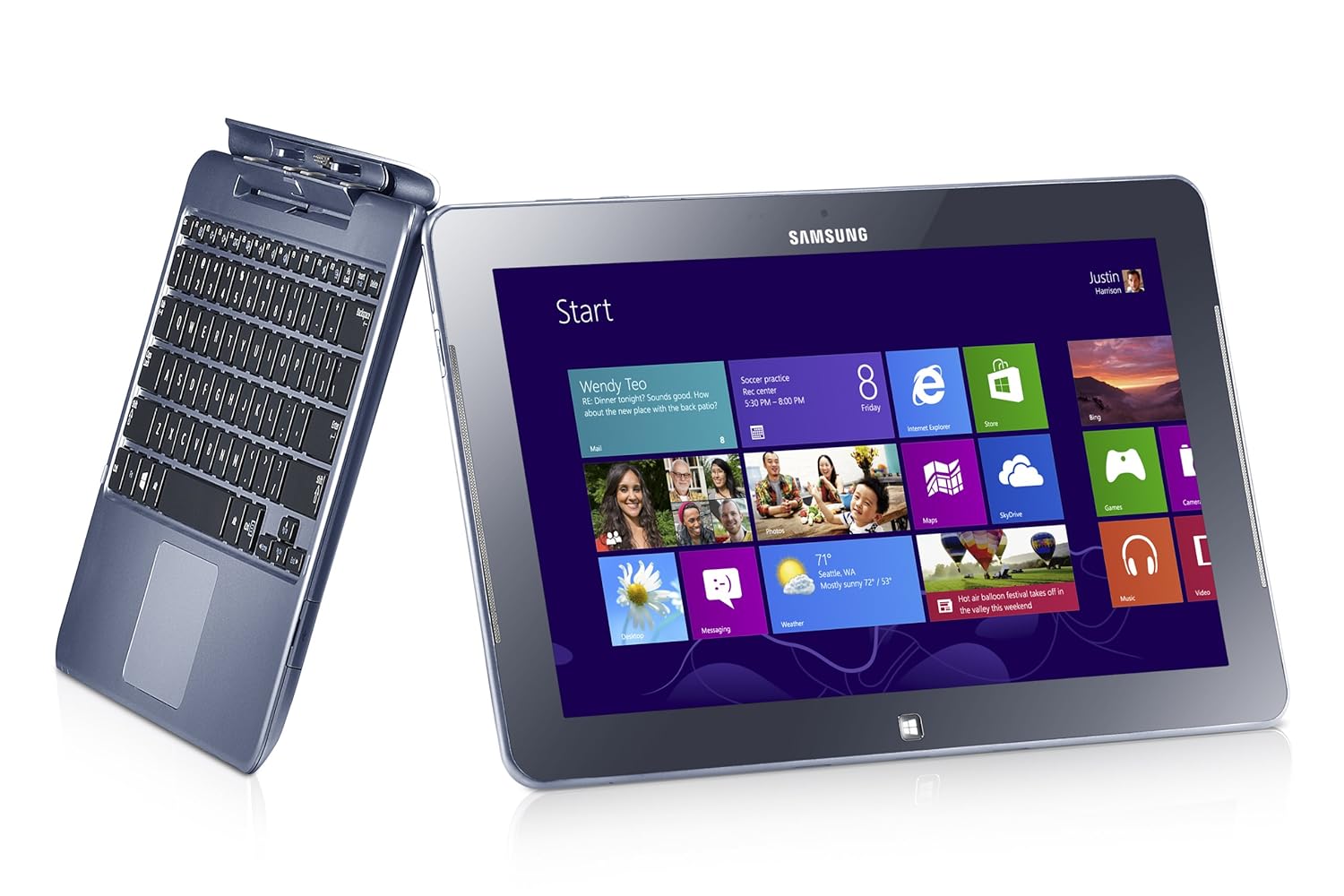
It cost me roughly $1100 pre-tax in Ireland.  You can get it for roughly $600 pre-tax in the USA.  Yes … we are ripped off by the manufacturers.

The device has worked pretty well … but not perfectly.

I never intended it to be a laptop replacement … where I run things like Photoshop CS.  It was an iPad replacement, that I could use at conferences, and hopefully on trans-Atlantic flights.  There it works perfectly.  I’ve regularly used it all day long at events, confidently leaving the power supply at home or in my hotel room.  It works perfectly on my lap when docked into the keyboard, giving me a laptop like experience, unlike a Surface with the floppy-hinged keyboard.  I also found the stylus (not just a Surface Pro feature!) which docks into the tablet to be useful.  Ever sit through a tech event and wish you could draw a diagram?  I can Smile  I’ve switched from Evernote to OneNote (not MX) to make the most of this capability.

The battery goes on and on.  For example, I travelled from Dublin-London-Orlando in February and watched video in Dublin and London and during my flights.  The battery had charge left when we landed.  And this keyboard doesn’t even have a second battery!

The keyboard is pretty good (no, it’s not at the same level as a Lenovo laptop keyboard).  My Asus UX31 has an below par keyboard.  I preferred to use the tablet when writing/editing the latter part of Windows Server 2012 Hyper-V Installation And Configuration Guide

How about presenting?  I talk tech, so white boarding is a big deal.  The stylus with the IsoBoard app are a nice solution to that.  Modern slim machines use full or micro HDMI ports.  This tablet has a micro HDMI port. I bought a VGA connector … hotel meeting rooms tend to have old projectors with just VGA.  That works … sometimes.  If there VGA cable is daisy chained between the podium and the projector then adding the HDMI-VGA converter degrades the signal too much to use.  I’ve since bought a USB-VGA adapter and am waiting on a situation where it’s required – it has worked in a situation where it was not required.

The performance of the tablet cannot match a laptop, and I didn’t expect it to.  It’s a tablet with an Intel processor … stressing the word “tablet”.  If you need more muscle then get a Pro machine with an i5 and 4 GB RAM … and the shorter battery life that goes with it.  I think it’s a bit disingenuous to try compare/contrast a tablet with a laptop.  They have different roles, like a screwdriver and a power tool.

Samsung are regularly releasing updates via the SW Update tool.  I’ve a new driver or firmware every couple of weeks, and they also distribute Windows 8 bug fixes (not to be confused with security fixes).  One bone of contention here: you cannot download any of the Samsung tools from the support site.  That means you cannot install a rebuild.  You must do a refresh from Control Panel and stick with the OEM build.  That is pretty damned awful … and makes the Samsung a consumer device not fit for business use.

There is a flaw with the h/w.  If you push the tablet while docked, it seems to un-plug and play it self from the keyboard.  You get the disconnect sounds in Windows.  It requires a full disconnect and reconnect.  I’m not the only person to experience this.  That is pretty annoying.

I used to mount the SD card in a folder and moved the libaries into the mount folder (on the SD card).  I’ve since rebuilt the machine.  Now I install Office, etc on the SD card.  My libraries are in the default location, and I do a selective sync of SkyDrive to the C: drive.  SkyDrive misbehaved when I synced to the mounted folder, regularly disconnecting and requiring a resync.  Keep it simple, stupid!

The big question: would I buy this device if I had to do it all again?

Good question.  I think I would, for the battery life.  I wouldn’t buy a Windows RT device.  I’ve tried a number of the competitive products, and while some are prettier, the Samsung is nicer, even if Samsung support is awful.  I would consider the Samsung ATIV Smart PC Pro 700T (think Surface Pro, but with docking stylus, and transformer keyboard like above, and twice the battery life of the Surface Pro).  But I do like 12 hours batter over 8 hours and the Ultrabook horsepower of the heavier/warmer device.

It’ll be interesting to see what comes in the coming months.  Pro machines should start to ship with the Intel Haswell processors (new Core i with more battery life) and a new quad-core Atom with better performance/graphics.  We also will see Windows 8.1 sometime this year, as a free upgrade to Windows 8 owners from the Windows Store.  One tablet I’m interested in is the Toshiba WT310, a business oriented machine with a transformer keyboard (VGA and RJ45) and TPM chip (BitLocker).

Technorati Tags: ,

MVP Carsten Rachfahl Interviews Microsoft Storage Guru Jose Barreto

Fellow Hyper-V MVP, Carsten Rachfahl (@hypervserver) published an interview he did with Microsoft Program Manager Jose Barreto.  In the video, they talk about the massive changes that SMB 3.0 brings to storage of Hyper-V virtual machines, and other application data.

image