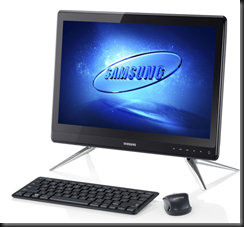
Windows 8 Devices At GA

I am no longer maintaining this list.  We’re at GA and it’ll be too hard to track from now on.

Here is my best effort listing of designed-for-Windows 8 devices that will be available at or soon after Windows 8 general availability (GA). I am not including laptops or PCs that are Windows 7 machines that “can be upgraded for 15 quid”.

This is based on best effort.  You’d be amazed how inconsistent some of this information is, e.g. no one was able to agree on the name of the new Toshiba “slider” … it’s actually called the U920, not the U925.

Technorati Tags: ,

More Windows 8 Devices At IFA 2012

The news keeps coming! Yesterdays news is here.

Dell

The Dell XPS 10 Windows RT tablet was announced.

Like most of the transformers, there are batteries in the tablet and in the keyboard.  Dell is claiming a 20+ hour life with this device. Nice!  Pocket Lint has more information and photos of this tablet.  Damn it is thin.

There will also be an XPS One 27 AiO with 10 point mutlitouch 27” screen. I reckon the home PC is shifting completely to the AiO design.  Maybe the business machine will eventually – but that might be many years away because most companies buy towers and reuse existing monitors, expecting a very long life for those monitors.  An XPS Duo 12 convertible laptop was also announced … I don’t like the look of the XPS converters that have been around for a while.

Samsung

They didn’t rest on their laurels yesterday. Samsung continued with the announcements with an ATIV WP8 handset and a traditional 10.1” Windows 8 tablet called the ATIV Tab, running Windows RT.

Engadget reckons it’s lower spec than the newest Android Tab from Samsung.  It weighs 570g and is 8.9mm thick.

HP

Guess who is back in the tablet space!?!?! The Envy x2 is a 11.6” transformer, which is proving to be the most popular of the designs from the manufacturers. I believe I read that this has an Atom “Clover Trail” processor. If it’s like the Spectre Ultrabook, then it’ll be on the higher end of the price range.  It looks like it’ll cost over $1000, pricing it out of the tablet range and putting it into a convertible laptop space.

There will be a Windows 8 Spectre XT Touchsmart Ultrabook too ($1,399.99).  This is the first Intel Ultrabook I’ve seen with Thunderbolt connectivity.  According to Techcentral.ie it

.. is 17.9mm thick and weighs 2.16kg. The laptop also features USB 3.0, Ethernet and HDMI ports.

They also say there will be an Envy Touchsmart Ultrabook with:

14" touch screen and a choice of Intel’s latest Core processors. The ultrabook weighs 2.16kg and offers up to eight hours of battery life.

Toshiba

I love the designed-for-Windows 7 Z930 ultrabooks from Toshiba.  They keyboard is way better than the one in my Asus UX31.  Toshiba have opted to go for the hybrid ultrabook/tablet or slider form factor with the U925t Ultrabook.  Neowin reports that it will have:

an Intel Core i5 processor inside, along with a 128 GB SSD, two USB 3.0 ports, a HDMI port, two cameras (front and rear) and a media card reader. The keyboard has an LED backlight and a CkickPad with Windows 8 gesture support While the Satellite U925t will be released when Windows 8 launches on October 26th.

It’s a nice looking device, and it appears to inherit a lot of features from the Z930.

Technorati Tags: ,

Want To End Your IT Career? Then Recommend Java!

I hate Java.  There, I said it.  Any IT pro who has had to support multiple versions of this malware breeding ground knows that Java is a complete nightmare.  I detested dealing with Java when I was an administrator/engineer.  Well, the chickens have come home to roost for Oracle.

A commercially available attack hacker toolkit called Blackhole includes the ability to attack the latest version of Oracle Java on all platforms, including Windows, Mac OS, and Linux.  Attacks are already in the wild.  These drive-by attacks silently attack the Java VM when a user browses the web site, leaving the machine vulnerable to being taken over.

If you want to find out if your version of Java is vulnerable to any security flaws then you can check it on this website.  I can save you a mouse click: your Java is vulnerable because … all versions of Java are vulnerable:

“Oracle knew about zero-day Java vulnerabilities for months, researcher says” according to Computerworld.  I read on The Register that claims Oracle has known about the vulnerabilities since April.  Oracle are sticking silently to their patching schedule, and won’t patch the vulnerabilities until mid October.  That’s responsible of Oracle, eh? Not!

So with no patch to secure Java (there’s an impossibility!), security experts are recommending that you disable Java in your browser.  I’d go one step further: uninstall the sh1te and find alternative applications/banks that understand the need for security.  Anyone who continues to recommend or sell Java based apps should be ignored, fired, thrown off of a cliff (joking about the last action … I think).

Edit#1

For your Java fans, why don’t you read this and this:

“The most commonly observed types of exploits in 1H11 were those targeting vulnerabilities in the Oracle (formerly Sun) Java Runtime Environment (JRE), Java Virtual Machine (JVM), and Java SE in the Java Development Kit (JDK). Java exploits were responsible for between one-third and one-half of all exploits observed in each of the four most recent quarters” – A report in 2011.

As for Microsoft software having vulnerabilities; yes – any large software does, including Linux, Andoid and Mac OS.  You’re a naive moron if you think otherwise.  Where Microsoft rises above the competition is that they deal with the issues as they arise, release patches, and scream from the mountain tops to get you to patch.  They even give you simple free, and enterprise tools to automate this.  But naive morons don’t want to listen because they have their heads up their asses:

  • 23/09/2008: Microsoft released a security patch that would have prevented Conficker
  • 24/11/2008: Conficker is first discovered 1 month after Microsoft released the patch
  • Mid-2011: Conficker is still the #1 malware present on domain-joined (business) PCs, thanks to the naive, professionally negligent, morons who think they know better

Check yourself and your facts before you fire out stupid comments about Microsoft just cos you’ve gotten into bed with a malware breeding ground like Java.

EDIT#2

Oracle has since released an update.  I don’t have Java on my machines so I can’t tell you anything more about it.  I believe the Java updater only looks for updates once per month.

Technorati Tags:

Windows 8 Devices Emerge At IFA 2012

IFA (pr. eefa) 2012 in Berlin is the place to be if you want to get the inside track on new Windows 8 devices. Announcements started coming out:

Samsung

They have revealed some Series 5 and Series 7 All-In-One PCs (AiOs) that are 27”, 23.6” and 21.5”.

image

Ubergizmo has a breakdown of the specs that I’ve not seen elsewhere since the model news broke earlier this week.

Asus

They have announced four new laptops

Zenbook U500VZ, a 19.7mm-thick 15-incher with a full HD screen, full-size keyboard, Intel i7 quad-core processor and the option for Nvidia GT650M graphics and up to 512GB of SSD storage

There’s a UX21A Touch with multitouch and 256 GB SSD.  It looks very like the UX31 that I own.  The Asus Taichi is that awful looking dual screen laptop with a screen on the outside (tablet) and a screen on the inside (laptop with keyboard).

Asus also announced their tablets called Vivo (previously 810 Transformer) and Vivo RT (previously 600 Transformer)

asus vivo tab

The Vivo RT device is a Tegra with 2 GB RAM and 32 GB SSD.  That’s OK.  The Vivo is an Intel dual core Atom with 2 GB RAM and 64 GB SSD.  Atom.  Hmm.

Sony

Not to be left out, Sony has announced two devices at IFA 2012 as well.  The Vaio Duo 11 is an 11” slider device. 

sony-vaio-duo-11-pr[1]

It’s basically an Ultrabook with a touchscreen in an interesting new design. It lies flat and you use it as a tablet with the various sensors you’d expect. You need a keyboard?  Slide up the screen and there you go, something similar to a laptop. It looks like it’s coming in i3 to i7 with up to 256 GB SSD.

Confession time: I did an NDA reveal of this one while presenting on Windows 8 and had some hands on. It got a lot of attention from those present.  My #1 requirement of a device is that I can use it on my lap.  I was concerned because the screen extends out so much.  But this device passed the test with flying colours because the base counter balances it and makes it stable. This is a powerful machine – I played with the i7 256 GB SSD model – that cuts it both as your laptop and as your tablet.

photo (2)

A really interesting 20” machine called the Vaio TAP 20 was also released.  I describe it as a portable AiO. 1600 * 900 resolution, up to 1 TB storage, multi-touch (10 I think), and it converts from a tabletop to a propped up monitor.  And that’s where the magic is.

Yup, I also got some hands on with the TAP 20.  In fact, everyone wanted to play with it.  Standing up, it’s a PC, offering a nice group interaction experience. Raise the kickstand, and you can pick it up easily, bring it to another room, lay it flat and it’s a table top flat gaming platform.  I demonstrated it drawing with 10 touch points so it can be a multiuser experience.  Everyone who tried or saw it was intrigued by the possibilities.

Technorati Tags: ,

Setting Up Windows To Go & Enabling The Windows Store

Windows To Go (WTG) is a new feature for Windows 8 Enterprise edition (the edition of Windows 8 that is available to customers with Software Assurance, e.g. OVS or Windows Intune) that allows you to install Windows 8 Enterprise on a USB 3.0 stick. That can be useful for a few reasons:

  • BYOD: Allow users to buy their own machines (with USB 3.0 ports) and bring them onto the company network.  Something like NAP/NAQ will keep their home OS isolated.  Supply the end users with WTG USB sticks that are complete with the corporate build.  They can then get onto the network and access company resources from their own machines by booting up using the company image on the stick.
  • Test/Evaluation/Demo: You have a Windows 7 build on your machine but you want to be able to show or use Windows 8 without dual booting or wiping. That’s the case with my Ultrabook; I am in the middle of writing a book and don’t want to disturb my working environment. Every other machine I have is on Windows 8 but my Ultrabook is a nice machine to demo with because it is light and small, but there is no room on the SSD to dual boot.  Booting from USB 3.0 gives me a portable temporary environment that doesn’t impact what’s installed on my laptop’s SSD.

WTG supports BitLocker which is great; USB sticks are easy to lose and losing a WTG stick would be like losing your laptop. That’s bad if the thing is unencrypted. With BitLocker you have protected the OS and data on the stick so the only pain is the pain of losing an expensive USB 3.0 stick.

Hardware Requirements For Windows To Go

The machine that will boot from Windows To Go must have a USB 3.0 port. 

The USB 3.0 stick must be one of the supported devices.  One of those is made by Kingston, and I’m lucky enough to have their WTG device in my possession – I work for a Kingston distributor.

Setting Up Windows To Go

Insert your USB 3.0 stick. Next you need to supply a Windows 8 Enterprise image, which can be:

  • Original image such as install.wim on the Windows 8 Enterprise media
  • A captured generalized image with your corporate build on it

Go into the Metro new UI and type Windows To Go.  That will do a search (below) and change the context to Settings.  The Windows To Go shortcut will appear.  Start it.

image

I’ve selected my Kingston DT Ultimate device as the destination for the image deployment.  Notice the warning?  I’m building the image on my PC, and it does not have a USB 3.0 port.  That’ll slow down the image deployment, but I need a USB 3.0 port to boot this thing up reliably.  The second USB in my example is my Windows 8 Enterprise installer.

image

Now pick an image to deploy on the USB 3.0 stick:

image

Now you can turn on and configure BitLocker to encrypt the USB 3.0 stick:

image

Now you can go ahead and create the stick!

image

Eventually the wizard finishes. You now have the option of rebooting your machine to boot up using the USB 3.0 stick.  Remember that your machine must be configured to boot from USB 3.0.


image

And that’s it!  Your stick is prepared.

Booting Up Windows To Go

Pop the USB 3.0 stick into the USB 3.0 port of the machine you want to boot up on.  Power up the machine.  In the case of my UX31, I press <ESC> to bring up a boot menu and select the Kingston USB 3.0 stick.

WP_000040

Enter the BitLocker password to access the device and then answer any setup questions.

WP_000041

My machine boots up in 12 seconds flat with WTG on the Kingston USB 3.0 device.  BTW, the stick gets HOT.  I’m told that it is a real SSD inside the stick.

The Windows Store

Open it in WTG and you’ll be told that:

Windows Store isn’t available on Windows To Go workspaces

According to TechNet:

Apps licensed through the store are linked to hardware for licensing. Since Windows To Go is designed to roam to different host PCs access to the store is disabled. You can enable the store if your Windows To Go workspaces won’t be roaming to multiple PC hosts.

USB 3.0 is portable between devices and therefore the Store is disabled.

You can override this behaviour to enable the Windows Store using Local Group Policy

  1. Open MMC. (Click Start, click in the Start Search box, type mmc, and then press ENTER.)
  2. On the File menu, click Add/Remove Snap-in.
  3. In the Add or Remove Snap-ins dialog box, click Group Policy Object Editor, and then click Add.
  4. In the Select Group Policy Object dialog box, click Browse.
  5. Click This computer to edit the Local Group Policy object, or click Users to edit Administrator, Non-Administrator, or per-user Local Group Policy objects.
  6. Click Finish.

If you want to enable the Windows Store in your Windows To Go workspace then the policy you want to edit is Allow Store To Install Apps On Windows To Go Workspaces which is found at \Computer ConfigurationAdministrative TemplatesWindows ComponentsStore.  Enable this setting, and run GPUPDATE /FORCE to apply the GPO.

Although your WTG stick will be portable, the apps won’t be because they are licensed by the Store to the PC that the stick is in when they are installed.  Therefore:

Apps purchased from the Store are bound to the host PC’s hardware, using Windows To Go on another host PC will cause all the apps purchased from the Store to be disabled. Line of business apps that are side-loaded and default Windows Store apps will continue to work.

And:

If you are not going to enable the use of the Store on your Windows To Go workspace, we recommend that you remove the default Windows Store apps that come with the Enterprise image since you won’t be able to update the default apps unless you turn on the Store.

This might be nicer if the apps were licensed to the storage that they are on instead of the tin … but that would then cause a problem if you were replacing the storage in your machine.  I guess Microsoft had to do something and this was probably the best approach.

Enterprise Deployment

System Center 2012 Configuration Manager with SP1 will support Windows To Go.

You can use AD GPO to manage the Windows Store.

Technorati Tags:

Using Hyper-V Replica Before The Disaster

Hyper-V Replica allows you to do:

  • Test failover: bring online copies of the replica VMs in the DR site, ideally on isolated virtual switches to test without interfering with production systems.
  • Unplanned failover: An unexpected disaster such as an earthquake, tsunami, or fire, wipes out the building/site. You failover the VMs, losing maybe up to 10 minutes of data or more  (replication every 5 minutes, on a best effort basis depending on the WAN)
  • Planned failover: VMs are shutdown in the production site, the HRL is flushed and replicated to the VMs in the production site.  VMs are started up in the production site.

Folks in the USA south are fully aware that a hurricane is bearing down on them.  This is not a new experience for New Orleans.  Mandatory evacuations are in place in some parts.  This is exactly the scenario when a planned failover is best used.

Weather forecasts have predicted the onset of the hurricane and a likely trajectory.  Now is the time to perform that planned failover and have the VMs up and running in the DR site.  Benefits? 

  • It is a smooth transition with no data loss
  • The systems will be up and running in the DR site before the chaos of the evacuation and disaster

The dependency on the virtualisation administrator is greatly lessened with a planned failover already done.  To be quite heartless about it, the impact on the company will be lessened if the virtualisation admins are killed or are trapped by the disaster.

It is possible to orchestrate/order the VMs.  Some want to have a go about the lack of System Center 2012 SP1.  Pfft!  System Center 2012 is nice, but don’t need it.  A few lines of PowerShell and I have all the orchestration that I need.  I’ve already written/proven it and I’m no PowerShell guru.

Technorati Tags: ,

Backing Up Hyper-V Replica Virtual Machines In The DR Site

I’ve spent much of the last 6 weeks either thinking about or working on Hyper-V Replica. The topic of where to do backups came up in conversation. Normally it is advised to do a backup in the primary site and replicate the data offsite, ideally to the DR site where it will be readily accessible – storing it in an offsite warehouse that it under the same 3 metres of water as the production site is pretty useless!

Before you ask: Replication is not backup. Replication gives you current/recent copies of VMs/data.  Backup gives you an archive of days, weeks, months, or even years. And your need to retain archive data doesn’t disappear (practically or legally) just because you have invoked your DR plan.

So in the conversations, one of the guys wondered if maybe it would be more efficient to do the backup in the DR site.  That would mean running backups of the replica virtual machines that are created and maintained by Hyper-V Replica.  An interesting concept!

Patrick Lownds (Virtual Machine MVP, and co-author) quickly responded with a “no” thanks to a post that appeared on the TechNet blogs last night:

Backing up or restoring the Hyper-V replica is not supported.

Due to the inner workings of the Hyper-V replication architecture which may be in progress during the time of a DPM backup, there can be no guarantees of a successful backup or restore of virtual machines that reside on the Hyper-V Replica server.

My guess is that the HRL replay which is updating the replica VHDs every 5 minutes would prevent a reliable backup in the DR site.

That means that you should (and can) continue to backup the source virtual machines in the production site, and continue to replicate your backup offsite to the DR site.

For the wise-asses out there (you know who you are), let’s be clear:

  • Yes, you can still use Hyper-V Replica
  • Yes, you can continue to backup replicating VMs in the production site
  • Yes, your backup tool might be able to backup replica VMs in the DR site, but that doesn’t mean that this is supported. Don’t come crying to me (or anyone else) if you ignore this statement and your “engineering” bites you in the ass.
  • Non-replica VMs that are running on the DR site hosts can be backed up in a supported manner
Technorati Tags: ,,

New AD Replication Status Tool

Microsoft has released a new Active Directory replication diagnostics tool called ADREPLSTATUS.  Features include:

  • Auto-discovery of the DCs and domains in the Active Directory forest to which the ADREPLSTATUS computer is joined
  • “Errors only” mode allows administrators to focus only on DCs reporting replication failures
  • Upon detection of replication errors, ADREPLSTATUS uses its tight integration with resolution content on Microsoft TechNet to display the resolution steps for the top AD Replication errors
  • Rich sorting and grouping of result output by clicking on any single column header (sort) or by dragging one or more column headers to the filter bar. Use one or both options to arrange output by last replication error, last replication success date, source DC naming context and last replication success date, etc.)
  • The ability to export replication status data so that it can be imported and viewed by source domain admins, destination domain admins or support professionals using either Microsoft Excel or ADREPLSTATUS
  • The ability to choose which columns you want displayed and their display order. Both settings are saved as a preference on the ADREPLSTATUS computer
  • Broad OS version support (Windows XP -> Windows Server 2012 Preview)

Check out the original blog post by Microsoft to learn much more.

Broken AD replication has proven to be a bit of a curse in the past. I’m amazed at how many sites (not small ones either) don’t monitor this stuff, relying on cheapware ping-based monitoring rather than the application-layer monitoring of something like System Center 2012 – Operations Manager.  They end up with fragmented AD, all sorts of weird crap happening, etc.  If you’re a consultant in a site and you’re deploying/configuring something with a reliance on AD, then here’s a handy warning sign: the customer “approves” security updates manually, and the last update to their PCs/Servers was the most recent Service Pack for the OS (usually for Windows XP).  Take a little time and check the AD replication status before you proceed Smile

Note that this new tool does not support Windows Server 2000 – that’s long since left extended support.

Got To Play With The New Microsoft Wedge Mouse & Keyboard On Windows 8

One of the nice things about working for a distributor is that I sometimes get a chance to play with new toys when they come through the office.

The recent headline Wedge Touch Mouse and Wedge Keyboard from Microsoft briefly appeared on my desk this afternoon and I set them up with my Windows 8 laptop for a quick play.

image

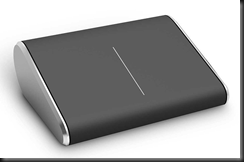
The Touch Wedge (of cheese) Mouse is an interesting design.  I swear the office is 50/50 split between loving it and not being keen on it, and to be clear, this is not a male/female divide either.  The thing is tiny and light.  Sitting in my hand, it could fit in half the length of my fingers.  I downloaded the software for the Wedge Touch Mouse and installed it.  What it gives you (and it says this on the box) is 4 way touch scrolling: up/down and left/right.  There was no other gesture support for Windows 8, such as pinch-zoom.  The control app does allow you to add other controls by the looks of it but I didn’t have time to explore that any more.

I can’t say this is a mouse I’d like to use.  I prefer the bigger and heavier Touch Mouse which I am using on a daily basis on my work laptop, and the “2000” mouse that I got recently for home.  But others in the office loved it.  Maybe it’s a love it or leave it thing, like Marmite.  I have to warn you, the Wedge Mouse is pricey.

image

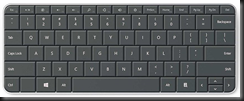
The Wedge Keyboard is an interesting solution for the pure tablet without a keyboard (cover).  It comes with a hinged touch rubber cover.  This cover for the keyboard has a second role, as you can see above.  It folds and can be used to prop up a generic tablet.  It’s a tidy little keyboard, being a little smaller than the layout of an Ultrabook.  With my brief play, it felt nice to type on.  I do not see it replacing keyboards like the 2000 or the 4000 for the PC, but it’s a nice tablet solution for those tablets that don’t come with or have keyboard options.  When you’re done typing, you stick the cover back on the keyboard and tick it in your bag with the tablet.  I’m guessing about the size of a Microsoft Surface tablet, but it appears to be around the same length.

image

Both devices are Bluetooth enabled.  Neither the Wedge Mouse nor the Wedge Keyboard require a Bluetooth receiver dongle like the older Touch Mouse does.  I really like that; those teeny tiny Bluetooth dongles are too easy to lose and I’ve always wondered why they exist when laptops come with Bluetooth receivers anyway.

Technorati Tags:

It’s Easy To See That VMware Is Scared Of Hyper-V

Not only are they reversing the virtual RAM vTax that “would have no effect” on customers and help them to “right-size their clouds” but now their marketing mouthpiece is saying that concurrent live migrations are bad. LMFAO Smile

I love that he tries to make a point that the default maximum live migrations is 2, and that it must be sooo hard to change that number in the GUI.

This is a last grasp at trying to score points that only the most blinkered fanboy could agree with makes Novell Netscape VMware look really bad.  I love it Smile

And don’t forget, VMware storage is insecure too.

Hey Eric, while you’re blogging, can you let the VMware customers who paid memory vTax over the last year to right-size their clouds know how they can get a refund to return to their “VM sprawl” once again?

EDIT:

I just realised that by reading that post, VMware seem very unsure of using vMotion to migrate VMs with production workloads. Oooh, is vMotion that fragile?  I guess it might be seeing as it is allegedly based on Legato Replistor code and we all know how reliable Replistor was … oh .. right … it wasn’t that reliable at all.  Don’t worry vFanboys, Live Migration always leaves your VM running, even if something bad happens.  No bridges are burned; If the VM can’t migrate, it stays where it originally was, completely unharmed and uninterrupted.

Technorati Tags: ,